Artificial Intelligence is only as good as the information it can access. Many organisations invest heavily in AI but still struggle to provide accurate answers because their data lives in disconnected systems, knowledge bases, spreadsheets, applications, and records. This is where the ServiceNow Knowledge Graph changes the game. Rather than treating information as isolated pieces of data, the Knowledge Graph connects people, departments, services, locations, knowledge articles, and business processes into a unified model that AI can understand.
In this guide, we'll explore what the ServiceNow Knowledge Graph is, how it works, how it integrates with Virtual Agent and AI Agents, and why it has become one of the most important components of the ServiceNow AI ecosystem.
What Is a Knowledge Graph?
A Knowledge Graph is a structured representation of organisational knowledge that shows how different pieces of information relate to one another. Think about how the human brain works. We do not store information as random facts. We naturally connect people, places, roles, responsibilities, systems, and experiences together. The ServiceNow Knowledge Graph works in a similar way. Instead of simply storing records, it creates relationships between data so AI can understand context and provide more meaningful responses. For example, when someone asks: "Who should I contact regarding HR leave requests?"
A traditional search system might return a list of HR documents. The Knowledge Graph understands:
- The employee's location
- Their department
- Their business unit
- The appropriate HR representative
It can then provide the correct person rather than simply returning documents. This creates a far more intelligent user experience.
Why Does the Knowledge Graph Matter?
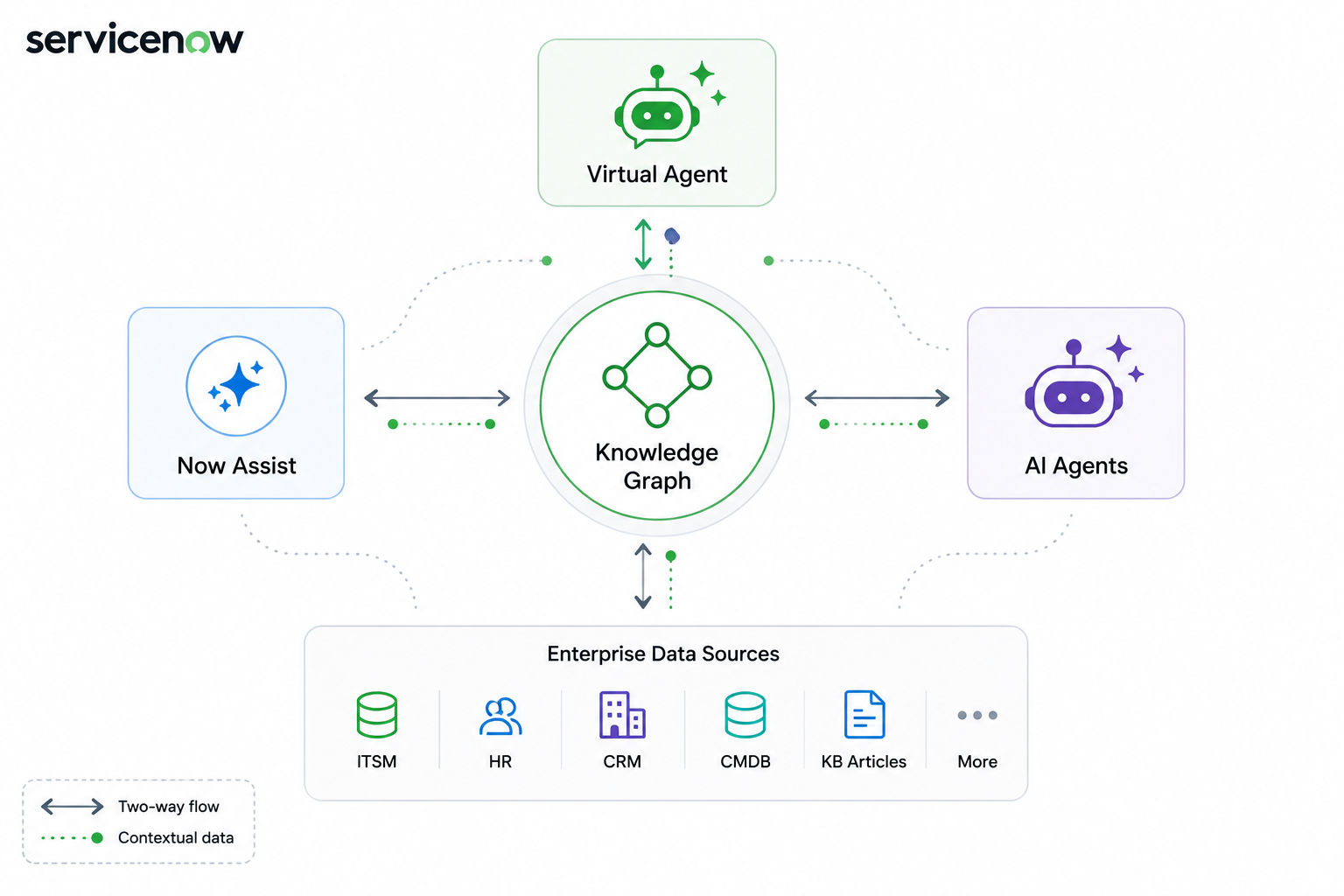
Many AI implementations fail because they lack the context needed to understand the full picture. Without context, AI may provide answers that are technically correct but too generic to be truly useful. The ServiceNow Knowledge Graph addresses this challenge by acting as a central intelligence layer that connects information from across the organisation, including ServiceNow records, knowledge articles, employee data, business services, configuration items, external systems, and third-party data sources. By understanding how all these pieces of information relate to one another, the Knowledge Graph enables Now Assist and AI Agents to deliver responses that are personalised, relevant, and actionable, helping users make better decisions and complete tasks more efficiently.
How the ServiceNow Knowledge Graph Works
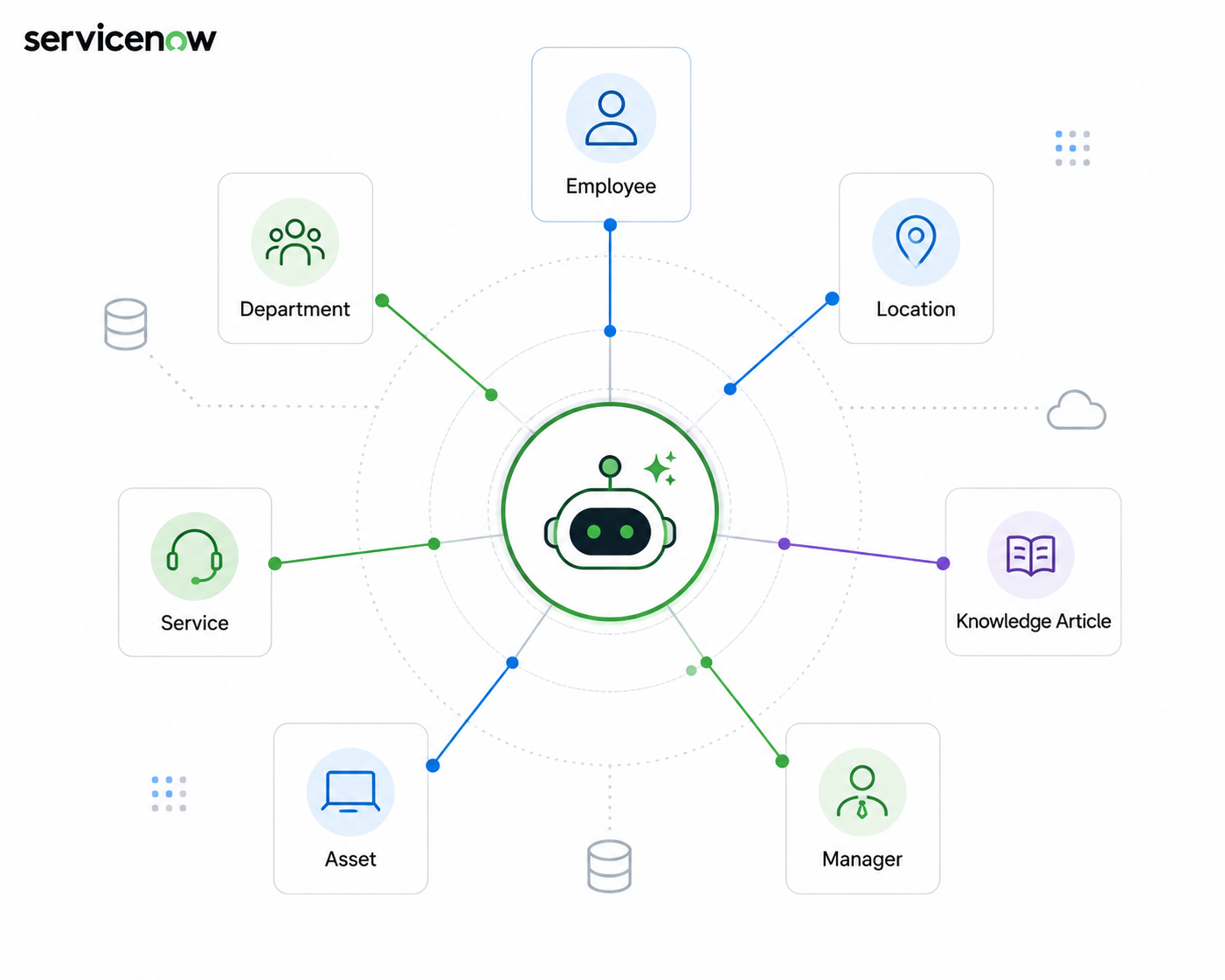
At its core, the ServiceNow Knowledge Graph is built on three fundamental components: nodes, properties, and edges. A node represents an object or entity, such as an employee, department, knowledge article, location, service, or asset. These nodes form the building blocks of the graph. Each node also contains properties, which provide additional details about that object. For example, an employee node may include the person's name, job title, department, office location, and manager. Finally, edges define the relationships between nodes, such as an employee belonging to a department, reporting to a manager, a service supporting a department, or a knowledge article relating to a specific service. These relationships create the intelligence within the Knowledge Graph, allowing AI to understand how information is connected and provide more accurate, contextual, and meaningful responses.
What Is A Knowledge Graph Designer?
One of the most impressive aspects of ServiceNow's Knowledge Graph capability is that it does not require advanced development skills.
ServiceNow provides a no-code tool called Knowledge Graph Designer.
Knowledge Graph Designer is a visual modelling tool that allows administrators and business users to create, modify, and manage knowledge graph schemas without writing code.
Using a drag-and-drop interface, organisations can:
- Create nodes
- Define properties
- Build relationships
- Modify schemas
- Test AI queries
- Validate results before deployment
This dramatically simplifies what would traditionally be a highly technical task.
Instead of writing complex scripts, administrators can visually build their enterprise knowledge model.
Step-by-Step: Configuring a Knowledge Graph in ServiceNow
Before AI Agents, Now Assist, and Virtual Agent can leverage enterprise knowledge effectively, administrators must configure the Knowledge Graph schema that defines how organisational data is connected.
Step 1: Open Knowledge Graph Designer
Navigate to: All > Knowledge Graph Designer
The Knowledge Graph Designer is ServiceNow's no-code modelling tool that allows administrators to create and manage relationships between enterprise data objects.
From here, you can either:
- Create a new schema
- Clone an existing schema
- Modify a pre-built schema
For most organisations, starting with a pre-built schema is often the quickest approach.
Step 2: Create Your Core Nodes
Nodes represent the business objects you want AI to understand. Common examples include:
- Employees
- Departments
- Locations
- Services
- Knowledge Articles
- Configuration Items (CIs)
- Assets
Select Create Node and add the objects that are relevant to your business processes. For example: Employee → Department → Location
This simple relationship already provides context that AI can use during conversations.
Step 3: Define Node Properties
After creating nodes, configure their properties. Properties describe the characteristics of each node. Examples:
Employee
- Name
- Employee ID
- Job Title
- Manager
- Department
Service
- Service Name
- Service Owner
- Criticality
- Support Group
These properties provide the information AI needs when generating responses.
Step 4: Create Relationships Between Nodes
This is where the Knowledge Graph becomes powerful. Relationships define how objects connect.
Examples:
- The employee belongs to the Department
- Employee reports to the Manager
- Service supports the Department
- Knowledge Article relates to the Service
These relationships allow Now Assist to understand context rather than returning generic answers.
Step 5: Connect Enterprise Data Sources
The Knowledge Graph can consume information from multiple sources, including:
- ServiceNow Tables
- CMDB
- Knowledge Bases
- HR Records
- Customer Service Data
- External Systems
Map these data sources to the nodes and properties within your schema.
This ensures the graph remains connected to live business data.
Step 6: Test Natural Language Queries
One of the most useful features of Knowledge Graph Designer is query testing.
Use the built-in testing panel and ask questions such as:
- Who approves leave requests for Sydney employees?
- Which support group owns Email Services?
- What knowledge articles relate to VPN issues?
The system will evaluate how the graph interprets relationships and returns results.
Testing before deployment significantly improves AI accuracy.
Step 7: Publish the Schema
Once testing is complete:
- Validate the schema
- Review relationships
- Confirm data mappings
- Publish the graph
The schema now becomes available for AI-powered experiences across the ServiceNow platform.
Step 8: Enable Virtual Agent and AI Agent Access
After publication, administrators can configure AI tools to use the Knowledge Graph. Common integrations include:
Virtual Agent
Used for:
- Context-aware conversations
- Slot filling
- Personalised responses
Now Assist
Used for:
- Enterprise search
- Knowledge retrieval
- AI-powered recommendations
AI Agents
Used for:
- Context gathering
- Decision support
- Multi-step reasoning
This enables all AI experiences to leverage the same enterprise knowledge model.
Creating Context-Aware AI Experiences
One of the biggest benefits of the Knowledge Graph is its ability to provide contextual responses. Context-aware AI refers to AI that understands the user's situation, profile, role, location, and business context before generating a response. For example: A new employee in Sydney may ask, "Who approves my leave request?"
The Knowledge Graph can evaluate:
- User location
- Department
- Reporting structure
- Leave approval process
The AI can then provide the exact approver instead of displaying generic policy information. This significantly improves user satisfaction while reducing unnecessary support requests.
Knowledge Graph and Virtual Agent Integration
A Virtual Agent is ServiceNow's conversational chatbot platform that provides automated assistance to users through natural language interactions. The ServiceNow Knowledge Graph enhances the Virtual Agent by automatically supplying contextual information, allowing it to understand the user's situation without repeatedly asking the same questions. Instead of requesting information that is already available, the Virtual Agent can retrieve details directly from the Knowledge Graph. This capability is known as slot filling, where the system automatically gathers the information needed before asking any additional questions. For example, if a user says, "I need help with my laptop," the Virtual Agent can automatically identify the user's location, assigned device, department, and support group. By using this context, the Virtual Agent asks fewer questions, provides faster assistance, and delivers a much smoother and more personalised user experience.
Knowledge Graph and AI Agents
AI Agents are autonomous AI-powered assistants that can perform tasks, make decisions, and execute workflows using enterprise data and business rules. When connected to the ServiceNow Knowledge Graph, AI Agents become significantly more intelligent because they can access rich organisational context rather than relying only on user prompts. This includes information about business processes, organisational relationships, service dependencies, user profiles, and historical knowledge. With a deeper understanding of how people, services, and data are connected, AI Agents can make more informed decisions, generate more accurate recommendations, and automate complex workflows with greater confidence. As a result, organisations can move beyond simple AI conversations and begin adopting true Agentic AI, where AI agents proactively assist users and complete tasks with minimal human intervention.
Benefits for Administrators
The Knowledge Graph provides significant advantages for platform teams. Administrators can:
- Build schemas from scratch
- Clone existing models
- Modify pre-built schemas
- Test queries before publishing
- Improve AI accuracy
- Reduce maintenance effort
- Extend enterprise knowledge over time
Perhaps most importantly, organisations can validate how AI will respond before exposing it to users. This removes much of the uncertainty that often exists during AI deployments.
Benefits for End Users
For employees and customers, the benefits are immediate. Users experience:
- Faster answers
- More personalised responses
- Less repetitive questioning
- Better search results
- Improved self-service experiences
- More accurate recommendations
Instead of hunting through multiple systems, users receive the right answer the first time.
Why the Knowledge Graph Is the Foundation of Enterprise AI
Many organisations focus on selecting the right AI model. However, the most successful AI deployments focus on something far more important: context. The ServiceNow Knowledge Graph provides the context layer that transforms AI from a simple question-answer tool into an intelligent enterprise assistant. By connecting people, systems, services, locations, and knowledge together, organisations can create AI experiences that are accurate, relevant, and actionable.
As ServiceNow continues expanding its Agentic AI capabilities, the Knowledge Graph is becoming the foundation that enables Virtual Agents, Now Assist, and AI Agents to understand how your organisation actually works.
Without context, AI provides answers. With the Knowledge Graph, AI provides the right answers.
Key Takeaways
1. The Knowledge Graph Creates Context
It connects enterprise information through nodes, properties, and relationships so AI can understand how data relates across the organisation.
2. Virtual Agents and AI Agents Become Smarter
By accessing contextual enterprise knowledge, AI can provide faster, more accurate, and personalised responses.
3. Knowledge Graph Designer Simplifies Adoption
The no-code design interface allows administrators to build, modify, and test knowledge models without complex development effort.