Artificial Intelligence is rapidly changing how organisations manage work in ServiceNow. While many teams are familiar with Generative AI that can create content and answer questions, the next evolution is Agentic AI — AI systems that can analyse information, make decisions, perform tasks, and collaborate with other AI agents to achieve business outcomes. ServiceNow's AI Agent Studio provides a low-code environment where organisations can create, test, and deploy AI agents that automate real business processes. Whether you want to categorise incidents, generate change plans, or orchestrate multiple AI agents to solve complex problems, AI Agent Studio provides the framework to make it happen.
In this guide, we'll explain what AI Agents are, how AI Agent Studio works, how to create your first AI Agent, and how Multi-Agent Workflows enable sophisticated automation across your ServiceNow environment.
What Are ServiceNow AI Agents?
An AI Agent is an intelligent digital worker that performs specific tasks on behalf of users. Unlike traditional automation, AI agents can understand context, follow detailed instructions, make decisions, interact with records, and collaborate with people when approvals or additional information are required. Think of an AI Agent as a specialised team member. One agent may categorise incidents, another may generate implementation plans for change requests, while another may create testing procedures. Each agent has a clearly defined role, responsibilities, and instructions that guide its behaviour.
The benefit of AI Agents is that they help reduce repetitive manual work while maintaining consistency and speed across operational processes.
What Is AI Agent Studio?
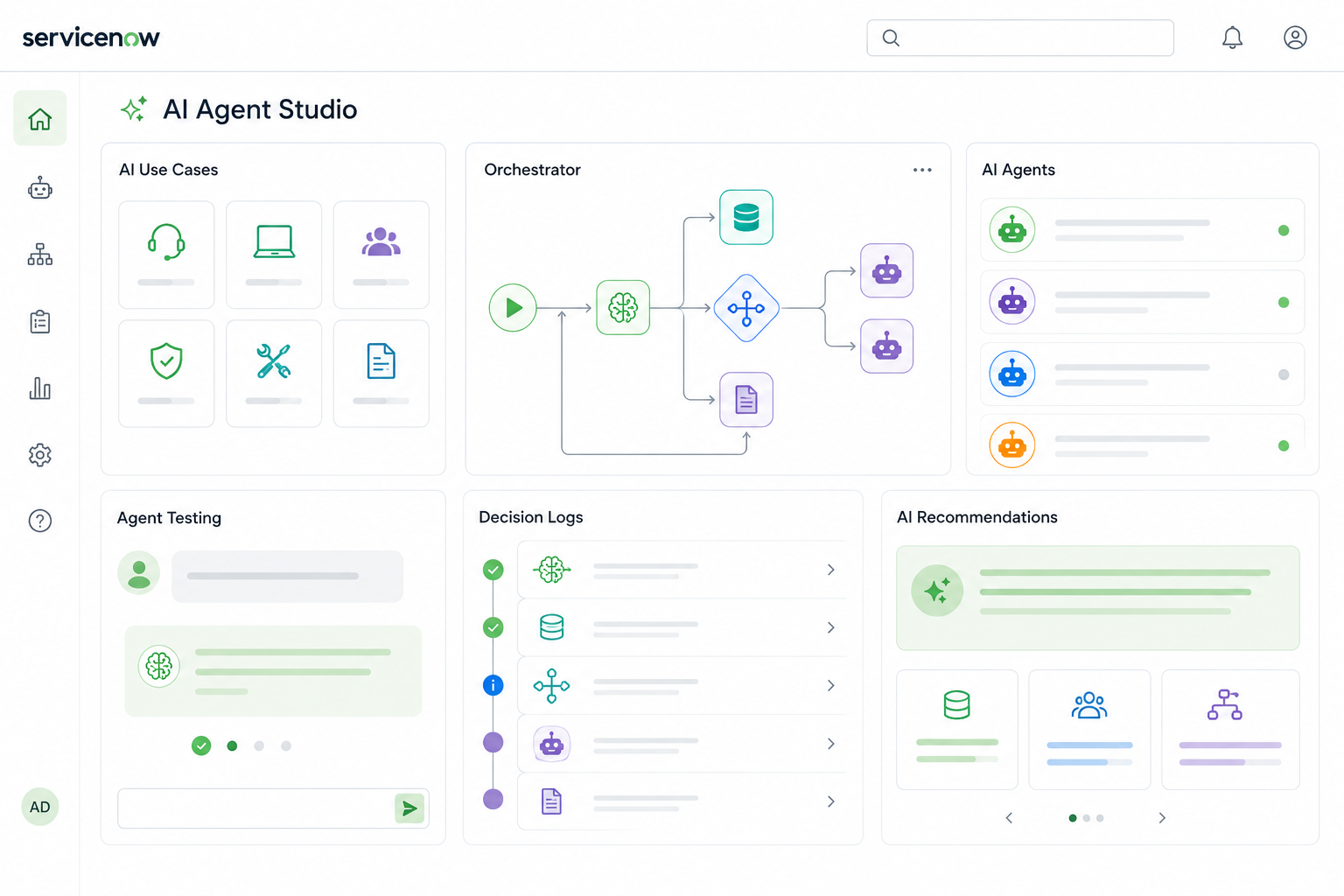
AI Agent Studio is ServiceNow's central workspace for building, configuring, managing, and testing AI Agents. Instead of writing complex code, administrators and platform teams can create AI-powered use cases through a guided interface. The platform allows organisations to:
- Create AI use cases
- Build individual AI agents
- Define agent instructions
- Configure triggers
- Test agent behaviour
- Monitor decision-making processes
- Build multi-agent orchestration workflows
The platform also integrates with Now Assist, enabling AI to help generate descriptions, instructions, and use case definitions automatically.
Step-by-Step: Create Your First AI Agent in ServiceNow
Step 1 – Open AI Agent Studio
From the Application Navigator, search for: AI Agent Studio
Open: AI Agent Studio → Create & Manage
This is the central workspace where you create, configure, test, and manage AI Agents and Agentic Workflows.
Step 2 – Create a New AI Use Case
Click Create New (or duplicate an existing use case if you want to customise an out-of-the-box example).
Enter:
- Use Case Name
- Business Outcome
- Description
For example:
Incident Categorisation
Describe what you want the AI to accomplish.
Example:
Automatically categorise incidents based on the incident description and recommend the correct Category, Subcategory and Configuration Item.
Instead of writing everything yourself, click Use Now Assist.
Now Assist automatically generates:
- Business description
- Agent instructions
- Initial configuration
which you can edit afterwards.
Step 3 – Configure Your AI Agent
Inside the use case, select Add Agent
You can either:
- Choose an existing AI Agent
- Create a brand-new AI Agent
For a new agent, configure: Agent Name
Example
Incident Categorisation Agent
Agent Role: Describe what the AI specialises in.
Example
You are an expert at analysing incidents and assigning the most appropriate incident category.
Agent Instructions: Provide detailed instructions explaining exactly how the AI should work.
For example:
- Read the Incident Description
- Identify important keywords
- Determine Category
- Determine Subcategory
- Recommend Configuration Item
- Ask the user for approval
- Update the Incident only after approval
The quality of your instructions directly affects the quality of the AI Agent.
Step 4 – Save and Continue
Once your instructions are complete, click Save and Continue
AI Agent Studio now moves to the Trigger configuration screen.
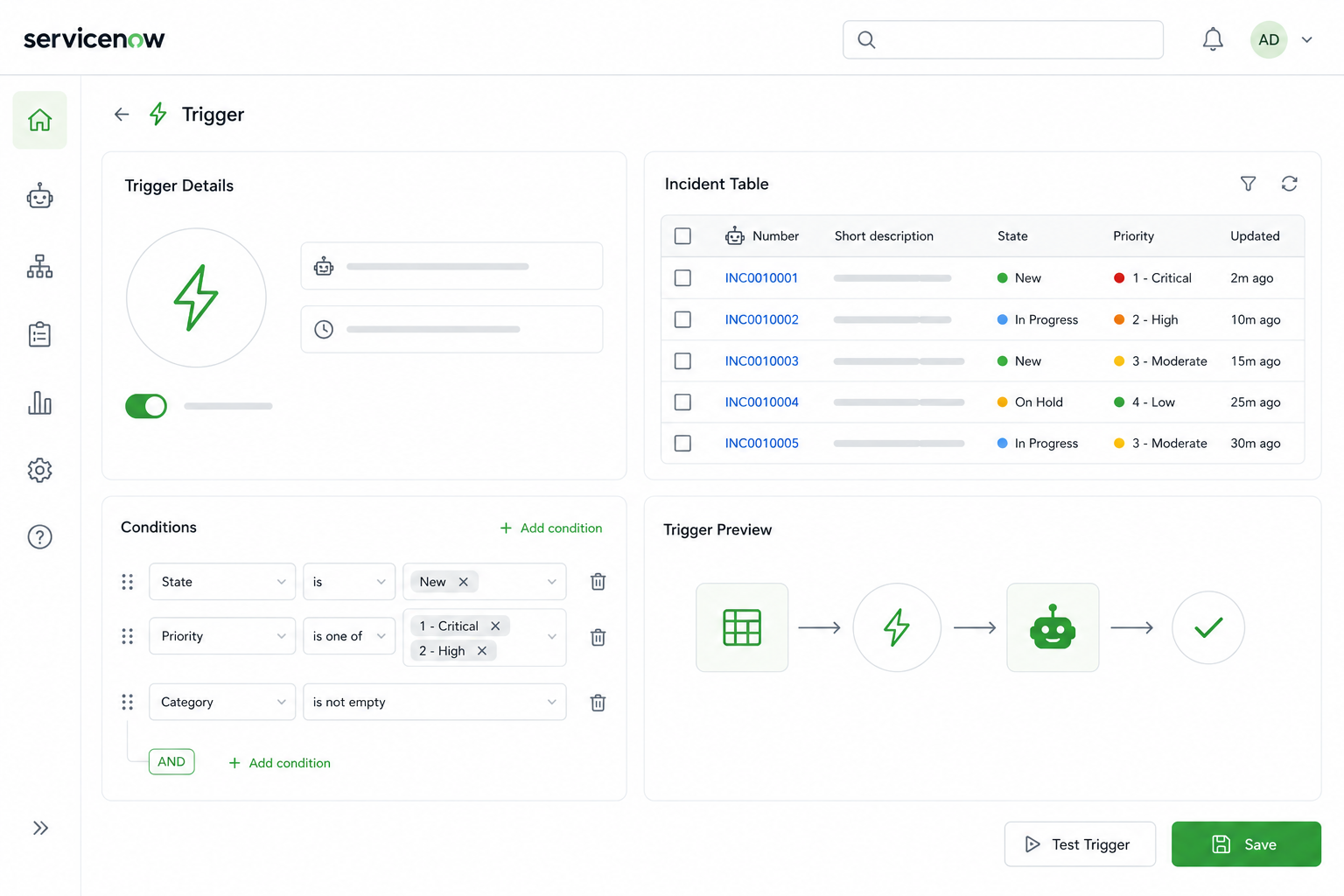
Step 5 – Configure the Trigger
Triggers determine when the AI Agent should run automatically.
Click Add Trigger
Choose one of the supported trigger types:
- Record Created
- Record Updated
- Record Created or Updated
- Scheduled
- Email Trigger
For an Incident Categorisation example, configure:
Table
Incident
Condition
Short Description is not empty
You can also specify:
- Run As user
- Notifications
- Objective Template
- Analysis Panel visibility
If you only want users to interact with the agent through chat, you can skip the trigger completely because triggers are optional.
Step 6 – Choose Access and Activation
Next configure:
- Who can use the AI Agent
- Chat assistant access
- Security controls
- Processing behaviour
Finally,
Activate the AI Agent.
ServiceNow allows you to control exactly which users and assistants can access each AI Agent.
Step 7 – Save and Test
Click Save and Test
ServiceNow opens the testing workspace.
Enter:
- Incident Number
- Change Request
- Record ID
Depending on your use case.
Click
Start Test
The platform immediately starts executing the AI Agent.
Step 8 – Watch the AI Think
One of the best parts of AI Agent Studio is the live execution view.
While the AI is running, you'll see:
- AI Orchestrator
- Active Agent
- Decision Logs
- Tool Calls
- AI Recommendations
- Final Response
You can watch every decision the AI makes in real time, making it much easier to understand, troubleshoot, and improve your agent.
Step 9 – Approve the Recommendation
If your AI Agent is designed to update records, it will typically ask for approval before making changes.
For example:
Recommended Category: Network
Recommended Subcategory: DNS
Configuration Item: MacBook Pro
The AI waits for confirmation.
Select:
Yes
or
No
After approval, ServiceNow automatically updates the Incident record. This human-in-the-loop approach helps maintain governance while still benefiting from automation.
Step 10 – Build a Multi-Agent Workflow
Once you're comfortable with a single AI Agent, you can create Agentic Workflows.
Instead of one AI Agent doing everything, several specialised agents work together under an AI Orchestrator.
For example, a Change Management workflow might include:
- Change Implementation Planner
- Backout Planner
- Test Plan Generator
- AI Orchestrator
Each agent focuses on its own task while the orchestrator coordinates the overall workflow, creating a complete end-to-end solution.
Multi-Agent Workflow Example: Change Request Planning
The transcript provides an excellent example of Multi-Agent Workflows using change management.
The use case automatically generates:
- Implementation Plans
- Backout Plans
- Test Plans
Instead of one AI agent handling everything, the work is distributed across multiple specialist agents.
These agents include:
Change Implementation Planner
This agent creates detailed implementation steps based on the change request information.
Change Backout Planner
This agent generates rollback procedures if the change fails or causes unexpected issues.
Test Planner
This agent creates validation and testing activities to ensure the change is successful.
AI Orchestrator
The orchestrator coordinates all three agents and manages the interaction between them.
The result is a structured, collaborative process where multiple AI agents work together to produce a complete change plan.
Human Collaboration Remains Important
One of the most important lessons from AI Agent Studio is that Agentic AI is designed to work with people rather than replace them.
Throughout the workflow, users can:
- Review recommendations
- Approve changes
- Reject outputs
- Provide additional instructions
- Refine generated plans
The transcript demonstrates how users can modify AI-generated plans and ask the agents to incorporate additional requirements before updating records.
This collaborative approach creates higher-quality outcomes while maintaining governance and accountability.
Why AI Agent Studio Matters
AI Agent Studio moves organisations beyond simple chatbots and content generation.
It enables businesses to build intelligent digital workers that can:
- Understand business context
- Make recommendations
- Update records
- Follow governance rules
- Collaborate with users
- Work alongside other AI agents
As ServiceNow continues to expand its Agentic AI capabilities, AI Agent Studio will become one of the most important tools for organisations looking to automate complex business processes safely and effectively.
The combination of AI Agents, orchestration, governance, and human oversight provides a practical framework for scaling enterprise AI across IT, customer service, HR, field service, and many other business functions.
Key Takeaways
1. AI Agents Are Purpose-Built Digital Workers
ServiceNow AI Agents perform specific business tasks using detailed instructions, context, and decision-making logic.
2. AI Agent Studio Simplifies Agent Development
Organisations can create, configure, test, and manage AI-powered workflows without extensive custom development.
3. Multi-Agent Workflows Enable Advanced Automation
AI Orchestrators coordinate multiple specialised agents, allowing complex business processes to be automated while maintaining human oversight and governance.