Managing projects has never been easy, and Project Managers, Product Owners, and Portfolio Managers are expected to juggle keeping projects on track, communicating with stakeholders, managing risks, analysing feedback, and maintaining detailed documentation; yet the real challenge is that much of their time gets consumed by administrative work rather than strategic decision-making. They find themselves spending hours reading customer feedback, writing status reports, creating user stories, updating project records, and preparing stakeholder communications, which leaves little room for higher-value activities.
This is where Now Assist for Strategic Portfolio Management (SPM) steps in, using artificial intelligence to automate many of these repetitive tasks so that project teams can shift their focus back to planning, collaboration, and delivery instead of getting bogged down in paperwork. In this guide, you will learn what Strategic Portfolio Management is, what Now Assist does, how AI-powered summarisation works, how story generation improves Agile delivery, how automated project updates save time, and how planning item refinement enhances backlog quality.
What is Strategic Portfolio Management (SPM)?
Strategic Portfolio Management (SPM) is ServiceNow's solution for managing projects, products, portfolios, and investments.
It helps organisations:
- Prioritise work
- Manage project delivery
- Track business outcomes
- Align investments with strategic goals
Think of SPM as a central workspace where organisations manage the work that drives business growth.
Why Do Project Teams Need AI Assistance?
Most project teams face the same recurring challenges, starting with feedback overload, as customer input pours in from emails, portals, surveys, support tickets, and meetings, making it extremely difficult to spot common themes across hundreds of scattered comments. At the same time, teams are buried in too much information—requirements, user stories, meeting notes, status updates, and risk registers all pile up, and simply reading through everything consumes a huge amount of time. Then there is the ongoing struggle of backlog management, where creating and refining Agile stories turns into a laborious exercise, with hours often wasted on splitting stories, rewriting descriptions, clarifying requirements, and removing duplicates. Now Assist directly addresses these pain points by embedding AI into the workflow, streamlining the process and giving teams back their time and focus.
Summarise Feedback and Documents
One of the most valuable capabilities of Now Assist is summarisation. Instead of reading large amounts of information, users can generate concise summaries in seconds.
What is Feedback Summarisation?
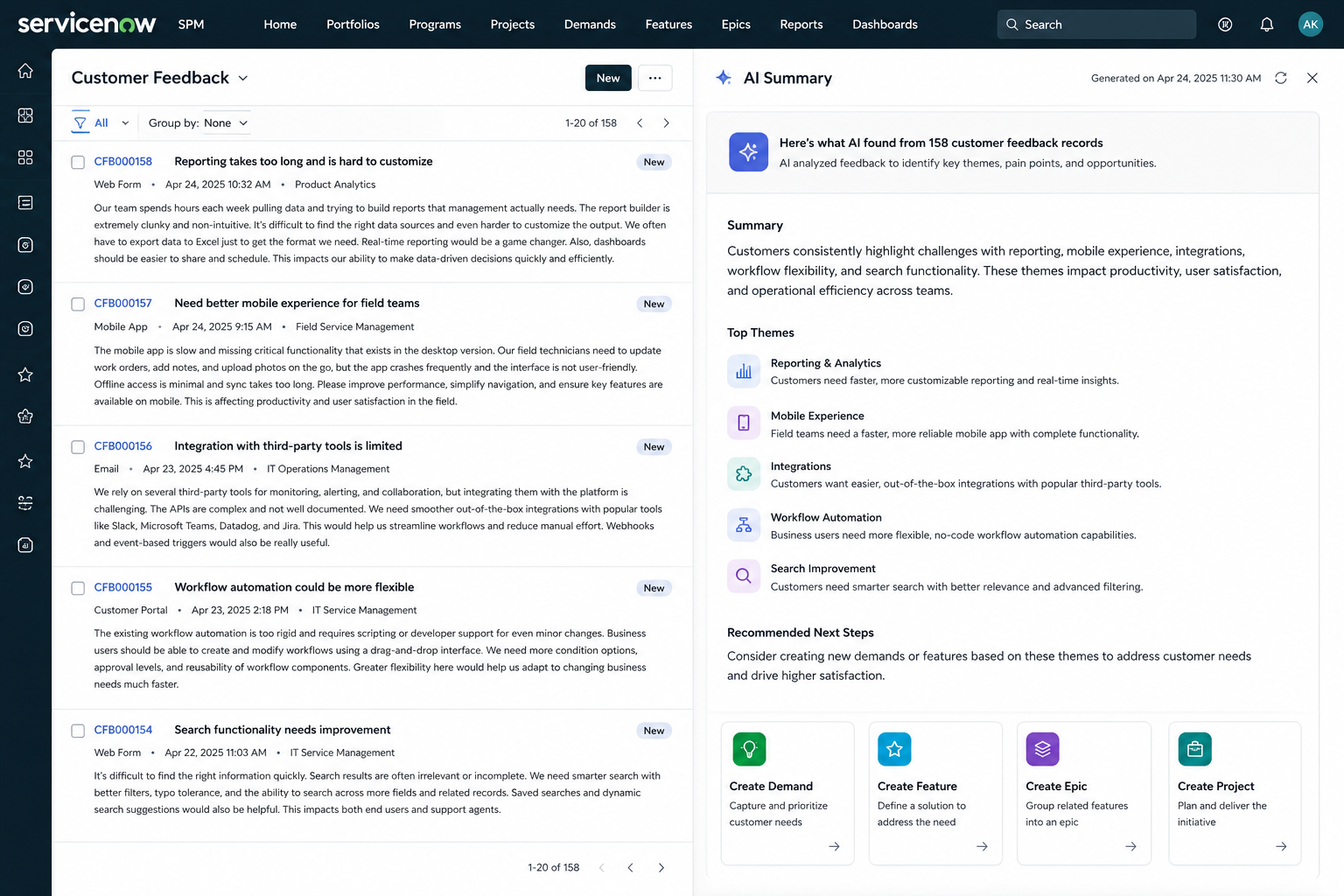
Feedback summarisation is a capability that allows AI to analyse customer comments and identify key themes. For instance, imagine receiving fifty customer comments related to application performance; instead of reading every single one individually, Now Assist produces a single summary that clearly explains common issues, customer concerns, and suggested improvements, helping teams quickly understand what customers are really saying.
Single Feedback Summarisation
Users can open an individual feedback record and generate a summary, which is especially useful when reviewing detailed comments from customers or stakeholders, as it distils lengthy or complex input into a clear, digestible overview without losing the essential points.
Multi-Feedback Summarisation
Users can select multiple feedback records and generate a combined summary, with the AI analysing all selected records to identify common patterns and recurring topics—for example, instead of reading fifty separate comments, you might receive a concise summary such as "Customers are requesting automated employment verification and PDF export capabilities to improve processing efficiency," saving significant time and effort.
Turn Feedback into Action
One of the most powerful capabilities is creating work directly from the AI-generated summary, so you can create demands, projects, features, or epics without re-entering information. This reduces duplication, minimises errors, and speeds up planning.
Document Summarisation
Now Assist can also summarise large planning documents and project records, helping users quickly understand objectives, risks, key decisions, and project status without having to read through lengthy descriptions, so teams can stay informed and make faster decisions with less effort.
Step-by-Step Configuration Guide for Now Assist for SPM
Before users can take advantage of AI-powered summarisation, story generation, and project reporting, administrators must activate and configure the relevant Now Assist capabilities within ServiceNow. This section explains how to configure Now Assist for Strategic Portfolio Management (SPM) and make the features available to your users.
Before You Begin: Prerequisites
Before starting the configuration process, ensure the following requirements are met.
1. Required Roles
You must have the System Administrator (admin) role.
This role provides access to:
- Plugin management
- Now Assist Administration
- AI skill configuration
- User role assignment
Without administrative access, you will not be able to activate or manage Now Assist features.
2. Licensing Requirements
Now Assist requires the appropriate ServiceNow licensing.
Before configuration, verify that:
- Your organisation has purchased Now Assist licensing.
- Your ServiceNow contract includes Strategic Portfolio Management (SPM) AI capabilities.
- The required entitlements have been provisioned.
Note that most Personal Developer Instances (PDIs) do not include Now Assist because of licensing restrictions.
3. Required Plugin
The following plugin must be installed: Now Assist for Strategic Portfolio Management
This plugin contains the AI skills used for:
- Feedback Summarisation
- Document Summarisation
- Story Generation
- Email Project Summaries
- Planning Item Refinement
Without this plugin, the SPM-specific AI skills will not appear in the administration console.
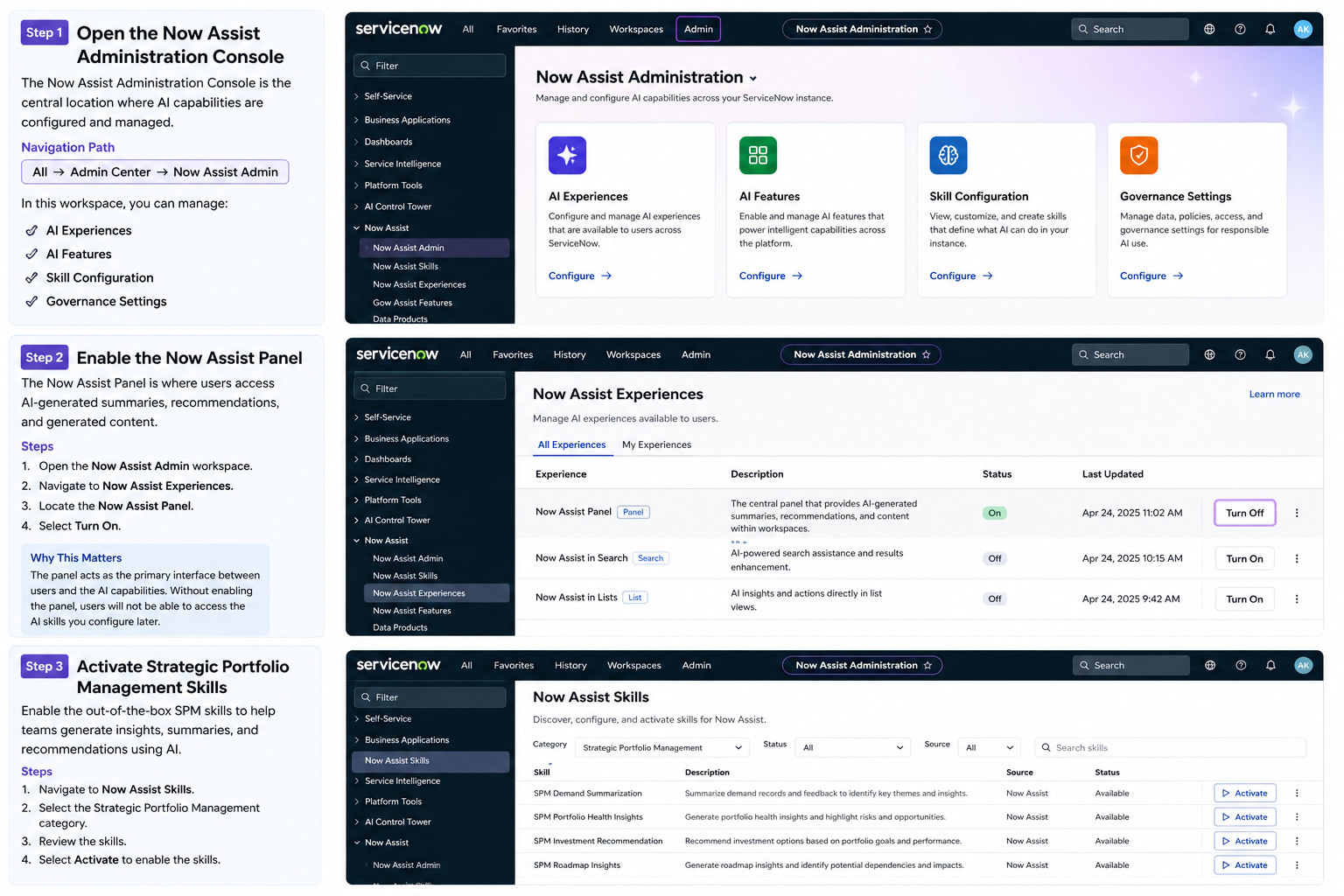
Step 1: Open the Now Assist Administration Console
The Now Assist Administration Console is the central location where AI capabilities are configured and managed.
Navigation Path
Navigate to: All → Admin Center → Now Assist Admin
Once opened, you will see the Now Assist workspace containing:
- AI Experiences
- AI Features
- Skill Configuration
- Governance Settings
Think of this workspace as the control centre for all Now Assist functionality.
Step 2: Enable the Now Assist Panel
Before users can interact with AI, the Now Assist Panel must be enabled. The panel is where users access AI-generated summaries, recommendations, and generated content.
Steps
- Open the Now Assist Admin workspace.
- Navigate to Now Assist Experiences.
- Locate the Now Assist Panel.
- Select Turn On.
Once enabled, users will see the Now Assist sparkle icon within supported ServiceNow workspaces.
Why This Matters
The panel acts as the primary interface between users and the AI capabilities. Without enabling the panel, users will not be able to access the AI skills you configure later.
Step 3: Activate Strategic Portfolio Management Skills
Now that the panel is enabled, you can activate the SPM-specific AI skills.
Steps
- Navigate to Now Assist Features.
- Select:
Technology → SPM
- Review the list of available skills.
You will see capabilities such as:
- Feedback Summarisation
- Project Document Summarisation
- Story Generation
- Email Project Summary
- Planning Item Refinement
Activate a Skill
For any skill showing a status of Not Started:
- Select View Details.
- Click Activate.
You will be taken to the skill configuration page.
Verify the Application Scope
Before saving your changes, verify the application scope displayed at the top of the page. Ensure it is set to:
Now Assist for Strategic Portfolio
This ensures configuration changes are saved to the correct application.
Review Skill Inputs
Most skills include predefined configuration settings. These typically specify:
- Which tables are analysed
- Which fields are used
- What information is sent to the AI model
In most implementations, the default settings are sufficient. However, administrators should review these settings to ensure they align with organisational requirements.
Configure Story Generation
The Story Generation skill includes additional configuration options. One important setting is:
Maximum Stories to Generate
This determines how many user stories the AI will create from an Epic. For example:
- 3 Stories
- 5 Stories
- 10 Stories
Choose a value that aligns with your Agile delivery practices.
Enable Display Settings
Before activating a skill, verify that the following option is enabled: Display = On
This setting controls whether users can see the skill within the workspace. If Display remains disabled, the skill may be active but invisible to end users.
Complete activation after reviewing the configuration:
- Select Review.
- Verify the settings.
- Select Activate.
The skill will now be available for authorised users.
Step 4: Assign User Roles
Activating a skill does not automatically grant access to users. Appropriate roles must be assigned before users can use the AI capabilities.
Feedback Summarisation Required role:
- pf_user
Document Summarisation Required roles:
- pf_user
- pf_read
- apw_user
- apw_read
- it_project_user
Email Project Summary Required role:
- it_project_user
Agile Story Generation Required roles:
- sn_apw_advanced.eap_user
- now_assist_panel_user
Step 5: Validate the Configuration
After activation and role assignment, test the configuration. Verify that users can:
- Open the Now Assist Panel
- Summarise feedback
- Generate project summaries
- Create stories from Epics
- Refine planning items
Testing ensures both the configuration and security permissions have been applied correctly.
Important Note for New Customers: ServiceNow has recently simplified the onboarding experience for many Now Assist capabilities.
In some environments, certain skills may be automatically activated when the plugin is installed. If you are a new customer, you may find that some of the configuration work has already been completed for you. However, administrators should still review:
- Skill settings
- Visibility settings
- User permissions
- Governance controls
to ensure the configuration meets organisational requirements.
Agile Story Generation
Creating user stories is one of the most time-consuming activities in Agile delivery. Now Assist can automatically generate stories from existing Epics.
What is an Epic?
An Epic is a large body of work that represents a significant business capability or requirement. Because Epics are often broad in scope, they need to be broken into smaller user stories before development can begin.
How Story Generation Works
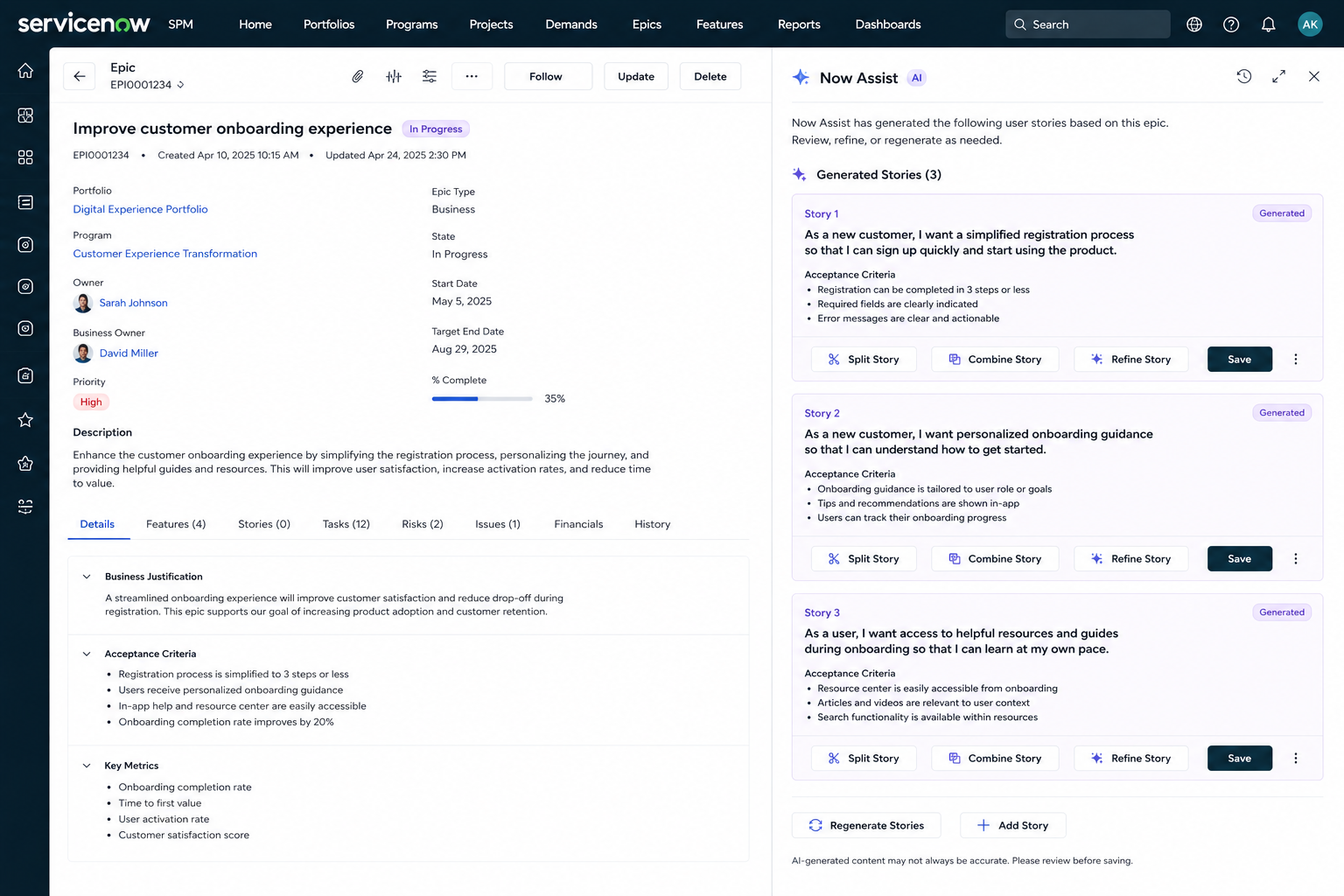
Users can open an Epic and select: Create Stories
Now Assist analyses the Epic description and generates multiple user stories. These stories are ready for review and refinement.
Story Splitting
Large stories can be divided into smaller, manageable stories. This makes sprint planning easier and helps development teams deliver work incrementally.
Story Combination
If duplicate stories exist, Now Assist can recommend combining them into a single story.
This helps maintain a cleaner backlog.
Story Refinement
If a story lacks sufficient detail, Now Assist can elaborate on the description and provide additional context. This helps teams create higher-quality requirements.
Automated Project Summaries
Project stakeholders want regular updates. Unfortunately, preparing these updates often takes considerable effort. Now Assist automates this process.
What are Automated Project Summaries?
Automated Project Summaries are AI-generated status reports created from project data. The AI reviews:
- Milestones
- Risks
- Issues
- Tasks
- Project updates
and creates a professional summary.
How It Works
Users navigate to the project workspace and select: Email Project Summary
They can then choose:
- Weekly
- Bi-Weekly
- Monthly
delivery schedules.
Benefits
Automated project summaries help:
- Reduce reporting effort
- Improve stakeholder communication
- Ensure consistent updates
- Save project management time
Planning Item Refinement
Not all backlog items are written clearly. Vague requirements can create confusion and delay delivery.
What is Planning Item Refinement?
Planning Item Refinement uses AI to improve backlog item descriptions. Users can:
- Expand descriptions
- Shorten descriptions
- Clarify requirements
- Improve readability
Example
A backlog item might say: "Improve mobile application."
This statement is unclear and difficult for developers to act on. Now Assist can generate a more detailed description explaining:
- What needs improvement
- Expected outcomes
- Business value
- Suggested actions
This creates better-quality requirements and reduces ambiguity.
Final Thoughts
Now Assist for Strategic Portfolio Management is not designed to replace Project Managers or Product Owners. Instead, it helps them focus on high-value activities by reducing manual administration.
By automating:
- Feedback analysis
- Story creation
- Project reporting
- Requirement refinement
Now Assist allows teams to spend less time on paperwork and more time delivering business value. As organisations continue adopting AI, tools like Now Assist will become an essential part of modern project management.
Key Takeaways
1. AI-Powered Summarisation Saves Time
Now Assist can analyse customer feedback, documents, and project information to generate concise and actionable summaries.
2. Agile Teams Can Accelerate Delivery
AI-generated user stories reduce backlog grooming effort and improve requirement quality.
3. Automated Reporting Improves Communication
Project stakeholders receive consistent updates without requiring Project Managers to manually prepare reports every week.