Artificial Intelligence is moving faster than most governance frameworks can keep up with. Many organisations have already deployed Generative AI, Agentic AI, machine learning models, and AI-powered workflows across departments. However, a common challenge remains: how do you govern all these AI assets consistently, securely, and transparently?
This is exactly where ServiceNow AI Control Tower comes in. Rather than treating governance as an afterthought, AI Control Tower provides a centralised workspace that helps organisations manage AI systems, risks, compliance requirements, lifecycle reviews, ownership, and business value from a single location.
In this guide, we'll walk through how to configure the key components of AI Control Tower using simple language and practical steps.
Why AI Control Tower Matters
Many organisations know how many servers they own because they maintain a CMDB. However, ask the same organisation:
- How many AI systems are currently running?
- Which AI models are high-risk?
- Which AI assets are non-compliant?
- Who owns each AI system?
- What business value is being delivered?
The answers are often unclear. AI Control Tower solves this challenge by creating a single source of truth for AI governance, similar to how CMDB provides visibility into IT assets.
Step 1: Access and Configure the AI Control Tower Dashboard
The first step is gaining visibility into your AI estate.
What the Overview Dashboard Shows
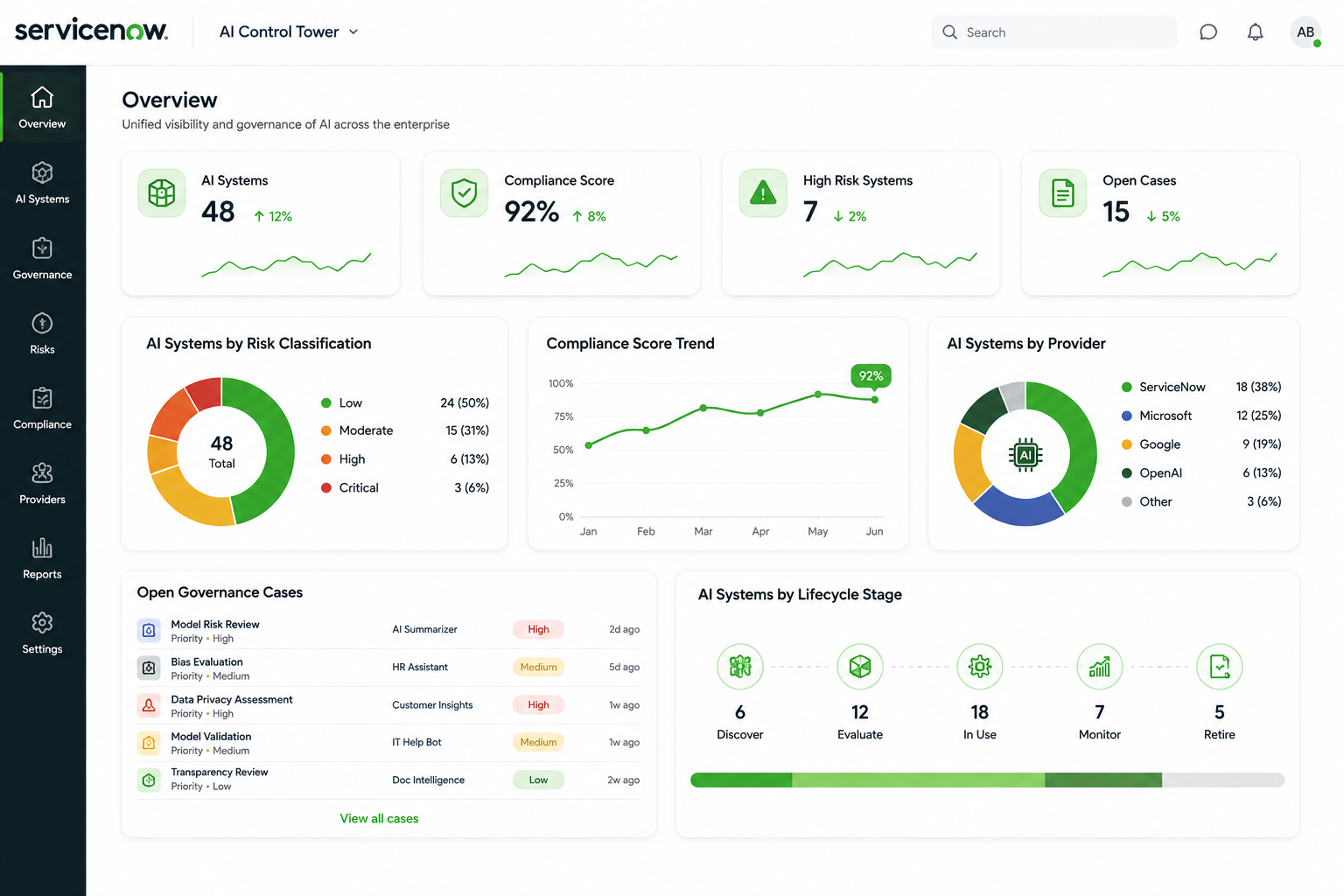
The AI Control Tower Overview tab provides an executive-level view of:
- AI systems currently registered
- AI systems awaiting review
- Risk classifications
- AI providers
- Compliance status
- Open AI governance cases
- AI adoption and productivity metrics
This gives AI Stewards, Risk Teams, and Executives immediate visibility into the organisation's AI posture.
Configuration Steps
- Navigate to Workspaces
- Select AI Control Tower Workspace
- Open the Overview Tab
- Review:
- AI Systems
- Compliance Widgets
- Risk Classifications
- AI Cases
- Productivity Metrics
5. Configure dashboard permissions based on user roles
The dashboard becomes the command centre for monitoring AI governance activities across the enterprise.
Step 2: Configure AI Governance Roles
One of the biggest mistakes organisations make is giving users too much—or too little—access. AI Control Tower uses role-based governance to ensure the right people can perform the right tasks.
Key Roles to Configure
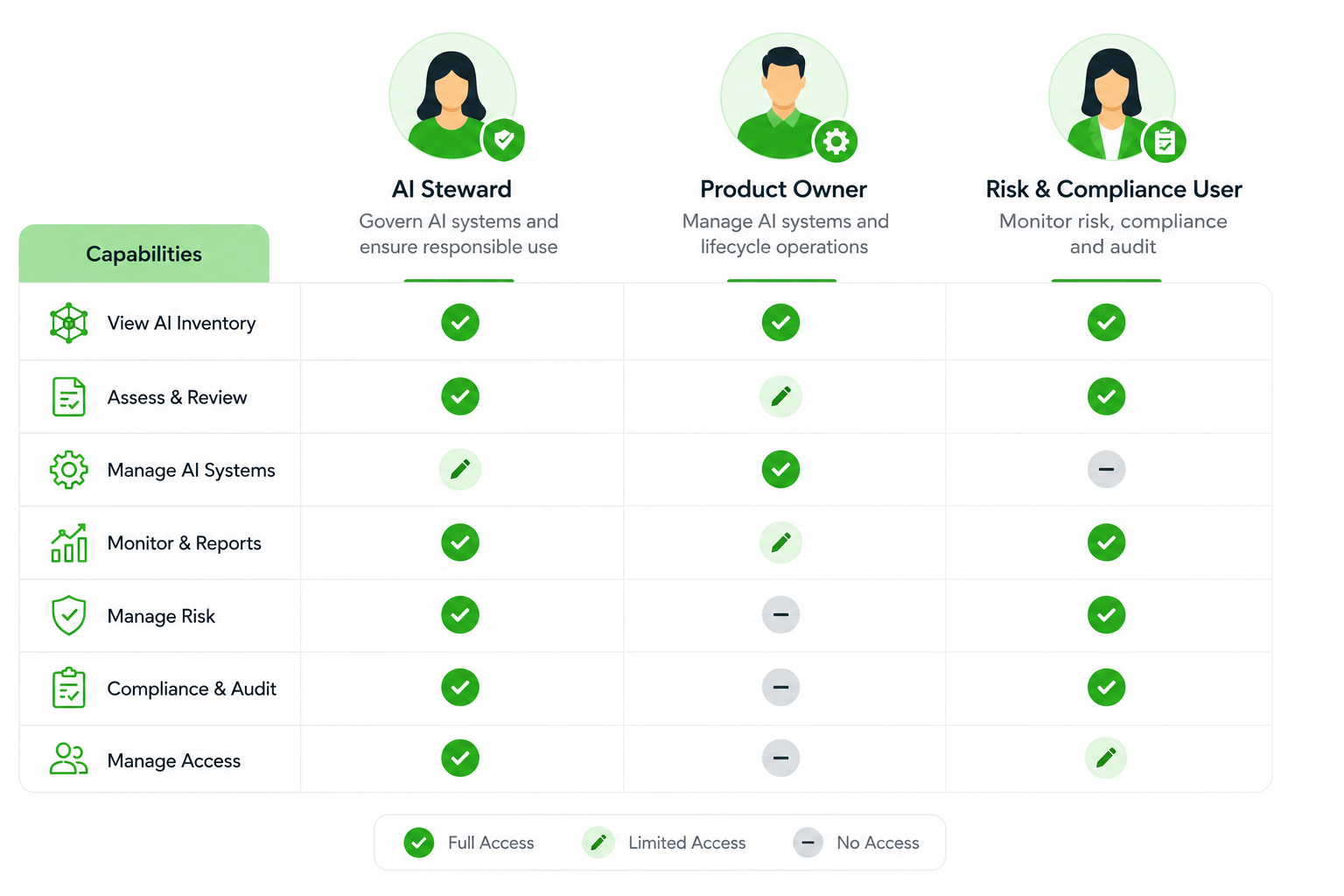
AI Steward
The AI Steward is the primary governance administrator.
Responsibilities include:
- Registering AI assets
- Managing lifecycle reviews
- Configuring governance frameworks
- Reviewing compliance
- Viewing the complete AI estate
How to Assign
- Navigate to:
- User Administration
- Roles
2. Search for:
- AI Steward Role
3. Assign the role to governance personnel
AI Product Owner
The Product Owner manages specific AI systems. Responsibilities include:
- Monitoring assigned AI assets
- Managing AI lifecycle activities
- Tracking asset performance
Unlike AI Stewards, Product Owners only see AI systems they own.
How to Assign
- Navigate to Roles
- Search for AI Asset Owner
- Assign to responsible AI product teams
Risk and Compliance Users
These users focus on:
- Compliance reviews
- Regulatory assessments
- Risk monitoring
- Audit readiness
Best Practice
Avoid assigning AI Steward access to every user. Maintain separation of duties between governance teams and AI product teams.
Step 3: Build Your AI Inventory Using CMDB
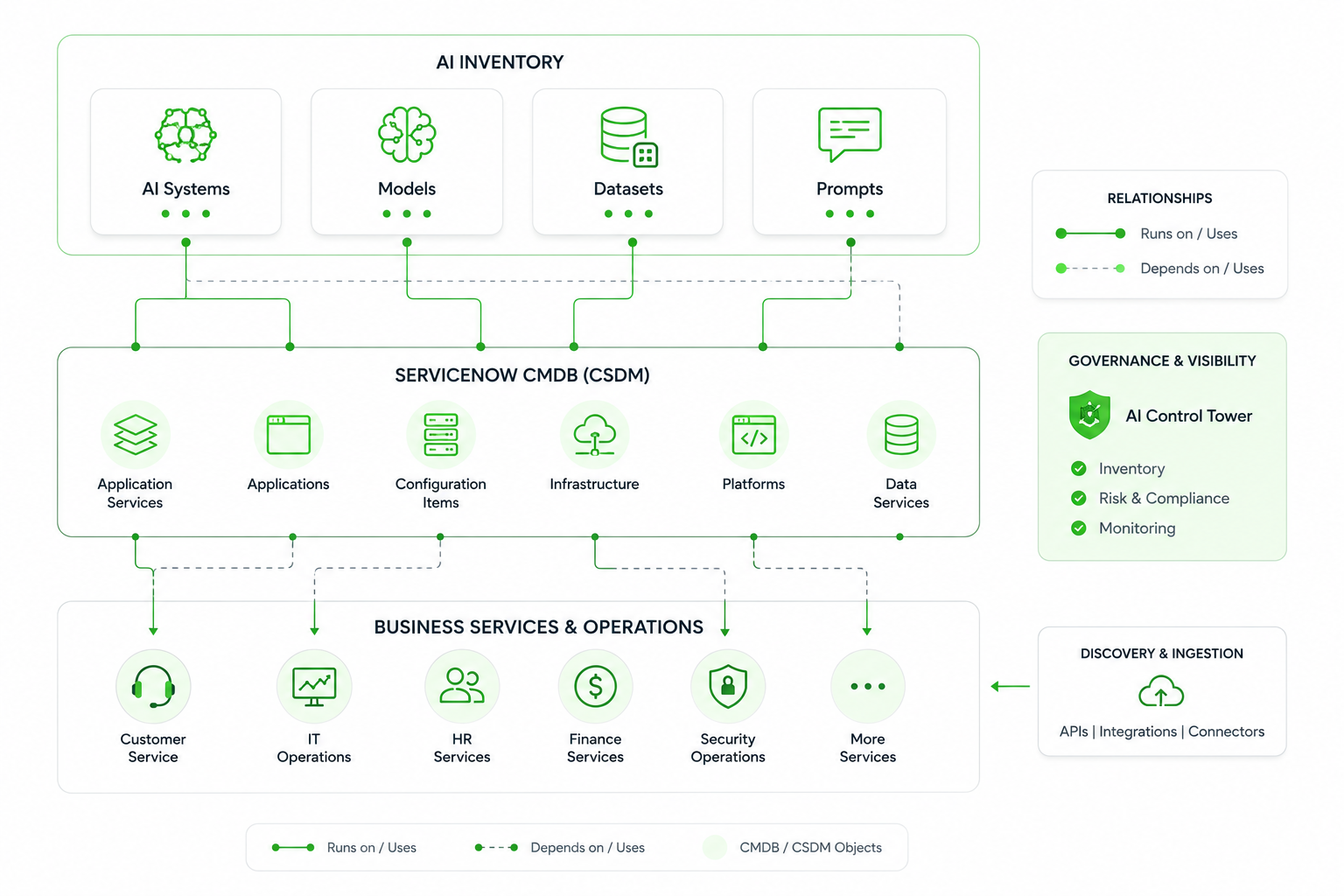
One of the most powerful capabilities of AI Control Tower is the AI Inventory. Think of it as a CMDB for AI.
Instead of tracking servers and applications, you're tracking:
- AI Systems
- AI Models
- AI Datasets
- AI Prompts
Understanding the Four Core AI Assets
AI System
An AI System represents the business use case.
Examples:
- AI Incident Classification
- AI Customer Service Assistant
- AI Knowledge Search
AI Model
The model powering the AI system.
Examples:
- OpenAI GPT
- ServiceNow Now LLM
- Azure AI Models
AI Dataset
The information used to train or evaluate AI models.
Examples:
- Customer Records
- Financial Data
- Support Tickets
AI Prompt
Instructions used by Generative AI systems.
Examples:
- Incident Summarisation Prompt
- Knowledge Search Prompt
- HR Policy Assistant Prompt
How to Create AI Assets
Step-by-Step
- Open AI Control Tower
- Navigate to AI Assets
- Select Create Asset
- Choose:
- AI System
- AI Model
- AI Dataset
- AI Prompt
5, Enter metadata:
- Owner
- Provider
- Risk Classification
- Business Function
6. Save and submit for review
This creates a governed AI record that can be monitored throughout its lifecycle.
Step 4: Configure AI Discovery and Populate the Inventory
Manually registering every AI asset is not scalable. AI Control Tower supports discovery and integrations to automatically identify AI assets.
Supported Discovery Sources
Examples include:
- AWS Bedrock
- Azure AI Foundry
- ServiceNow AI Agents
- SharePoint
- Employee Centre Requests
- External Data Sources
Configuration Steps
Configure AI Discovery
Navigate to:
- AI Control Tower
- Configurations
- AI Discovery
Create a New Connection
Select Provider:
- AWS
- Azure
- Other Supported Platforms
Enter:
- Authentication Details
- API Credentials
- Discovery Schedule
Run Discovery
Review Imported Assets
The discovered assets automatically populate the AI Inventory, creating a more complete governance view.
Step 5: Establish AI Lifecycle Management
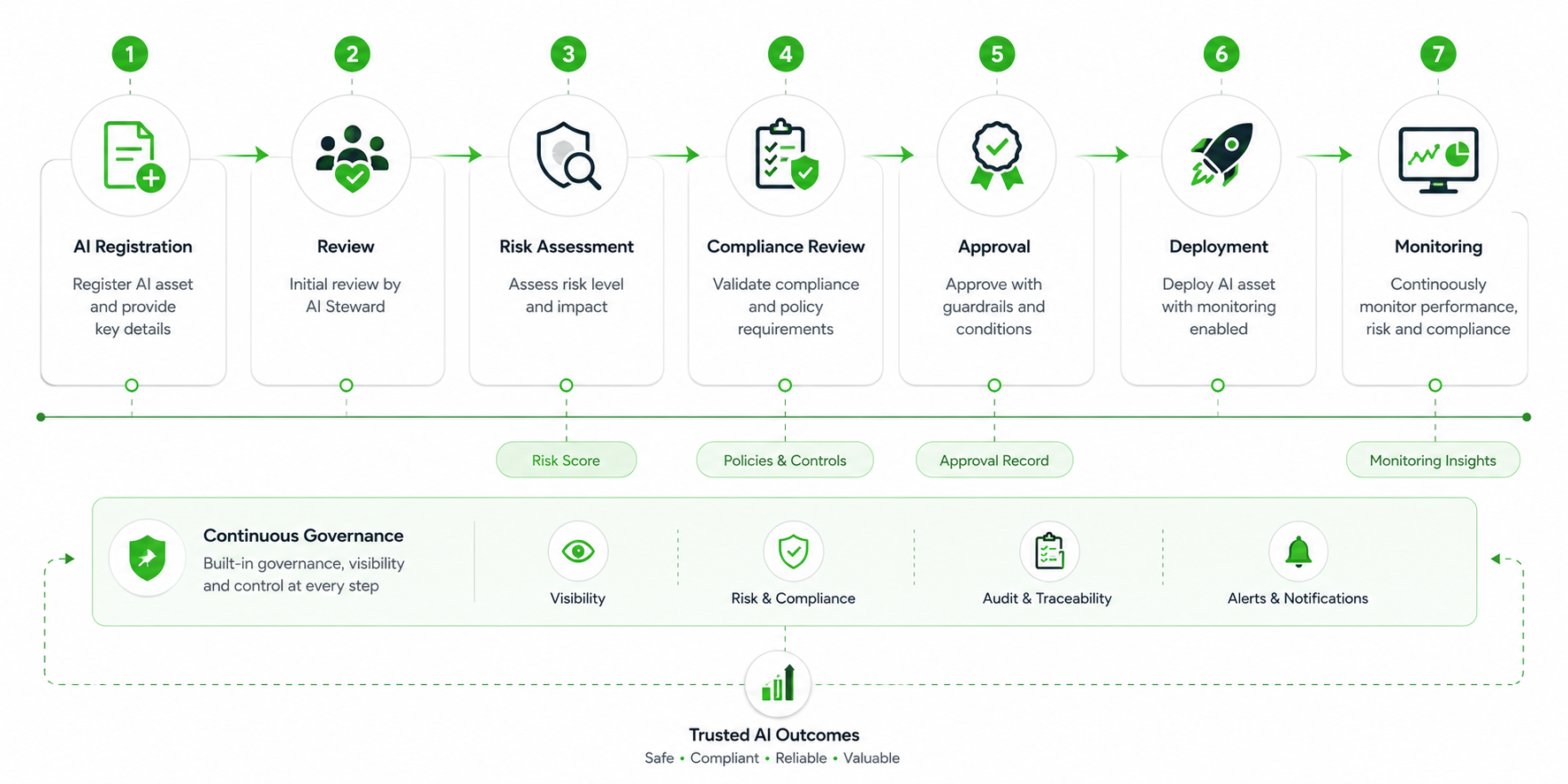
Once assets exist in the inventory, governance begins. AI Control Tower supports lifecycle management from intake through retirement.
Typical Lifecycle Stages
- New Asset Registration
- AI Steward Review
- Risk Assessment
- Compliance Validation
- Approval
- Deployment
- Ongoing Monitoring
- Retirement
Every AI system follows a documented governance process before entering production. This ensures governance becomes part of deployment rather than an afterthought.
Moving Beyond AI Visibility to AI Accountability
Many organisations have already started their AI journey. Far fewer have established the governance structures needed to scale AI safely.
ServiceNow AI Control Tower helps organisations move beyond isolated AI projects by providing:
- Centralised AI visibility
- Governance and compliance controls
- AI lifecycle management
- Risk monitoring
- AI inventory management
- Business value tracking
For organisations pursuing Generative AI and Agentic AI at scale, AI Control Tower provides the governance foundation required to drive innovation while maintaining control.
Three Key Takeaways
1. AI Control Tower acts as a CMDB for AI
It provides a central inventory of AI systems, models, datasets, and prompts, giving organisations complete visibility into their AI estate.
2. Governance starts with ownership and roles
AI Stewards, Product Owners, and Risk & Compliance teams each play a distinct role in ensuring AI systems remain compliant and well-governed.
3. Discovery and lifecycle management are critical
Automatically discovering AI assets and managing them through structured governance workflows helps organisations scale AI responsibly and confidently.