If you have Questions on how to enable the Now Assist Panel, govern AI safely, and deploy skills across ITSM, HR, and ITOM, this is the place for you.
Meet Your AI Co-Pilot:
Imagine having an AI assistant that sits right beside you while you work. It never leaves your screen. It understands the context of what you are doing. It can summarise long tickets, draft knowledge articles, explain change risks, and even help you close HR cases faster. That is exactly what the Now Assist Panel does inside the ServiceNow Next Experience user interface.
In this guide, you will learn:
- How to enable and access the Now Assist Panel
- How to configure AI governance using Now Assist Guardian and the AI Control Tower
- How to deploy powerful skills across IT Service Management (ITSM), HR Service Delivery (HRSD), and IT Operations Management (ITOM)
Whether you are an administrator, an agent, or a leader responsible for AI adoption, this guide will help you turn generative AI from a risky experiment into an enterprise-grade capability you can trust.
Part 1: The Now Assist Panel, Your Sidekick That Never Leaves
What Is the Now Assist Panel?
The Now Assist Panel is a side panel inside the Next Experience UI. It is:
- Always available – one click away from anywhere in the platform
- Context-aware – it knows which record you are working on
- Role-specific – it adapts to whether you are an IT agent, HR agent, or change manager
Think of it like a co-pilot that never leaves your screen.
And the best part? It all happens without leaving your current screen.
How to Enable the Now Assist Panel
Follow these three simple steps:
Step 1: Open the Now Assist Admin Console
Navigate to the Application Navigator
- Search for "Now Assist"
- Open the Now Assist Admin Console
- Select Overview
Step 2: Turn On the Panel
- Click on Now Assist Experiences
- Select Now Assist Panel
- Review the description and examples
- Click Turn On
Step 3: Access the Panel
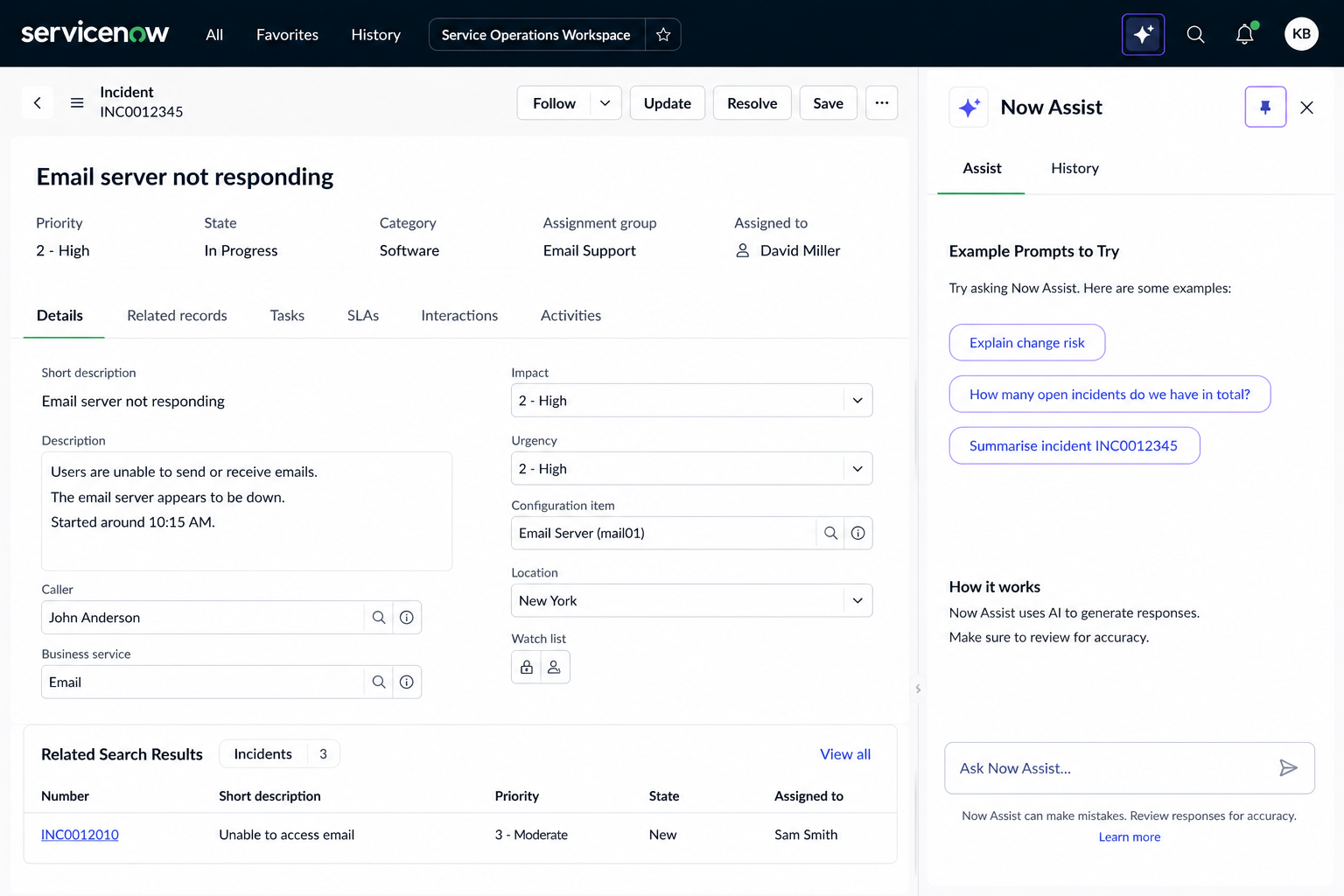
- Look at the top navigation bar
- You will see a new Now Assist icon
- Click it to open the panel on the right side of your screen
- You can pin the panel to keep it open permanently
- Click the plus (+) icon to start a new chat
Example Prompts to Try
Once the panel is open, try asking:
- "Explain change risk" – the AI will ask for a change request number
- "How many open incidents do we have in total?"
- "Summarise incident INC0012345"
Part 2: AI Governance – Trust Through Guardrails
Generative AI is powerful, but without governance, it can also be risky. That is why ServiceNow provides two critical capabilities: AI Control Tower and Now Assist Guardian.
AI Control Tower – Visibility and Compliance
The Control Tower gives you:
- Regulatory risk classifications for AI systems, models, and data sets
- Risk heat maps to visualise likelihood versus impact
- Drill-down into AI cases or regulatory alerts for investigation
Now Assist Guardian – Real-Time Safety
Guardian monitors every request for sensitive or harmful content. It can:
- Log or block offensive inputs, outputs, or prompt injection attempts
- Filter sensitive topics like HR issues and redirect users to safe fallback flows
- Automatically strip personally identifiable information (PII) before data goes to a large language model
How to Configure Guardian
- Go to Now Assist Admin Console → Settings
- Locate Now Assist Guardian
- Under Offensiveness, activate for ITSM or other plugins
- Choose: Log only (monitor but do not block) or Log + Block (prevent offensive content from being generated)
- Under Prompt Injection, switch the toggle to On to block malicious input
- Export logs at any time by clicking the three dots (...) and selecting Export CSV
Why Governance Matters
- Builds trust with your users, leadership, and regulators
- Reduces risk by enforcing compliance and detecting unsafe content
- Ensures AI adoption can scale safely across the enterprise
Part 3: Now Assist Skills Across Workflows
Once the panel and governance are in place, you can activate specific skills for different workflows.
ITSM Skills – The AI Co-Pilot for IT
Skill
Incident Assist
Incident Summarization
Resolution Generation
Change Risk Explanation
Change Request Summarisation
Knowledge Generation
What It Does
Ask natural language questions inside an incident
Condense long tickets into a clear summary and share to work notes
Suggest resolution steps based on past resolved incidents
Explain why a change was rated high, medium, or low risk
Summarise objective, plan, impact, and risk of a change
Draft a knowledge article automatically from a closed incident
How to use Change Risk in practice:
- Open a change request
- Click Change Request Summarisation
- Click Summarize
- The AI returns a summary + risk assessment
- Click Save to Work Notes
How to generate a knowledge article:
- Open a resolved (closed) incident
- Click Create Knowledge
- Select your knowledge base and template
- Click Yes, draft with Now Assist
- Review, edit, and save the AI-generated draft
HRSD Skills – AI for HR Agents
Skill
Case Summarization
Resolution Notes
Knowledge Generation
Case Assistance
What It Does
Condense long HR case activity into a short, clear summary
Generate concise resolution notes automatically when a case is closed
Draft knowledge articles from resolved HR cases
Ask natural language questions inside the case (e.g., "What policies apply to this request?")
How to summarise an HR case:
- Open an HR case in the HR Agent Workspace
- Click the Summarise button
- AI generates a summary of all activity
- Click Save to Work Notes
How to generate resolution notes:
- Open an HR case
- Change the state to Close Complete
- AI automatically generates resolution notes
- Edit or add notes as needed
- Click Add Notes to save to the activity trail
ITOM Skills – Cutting Through Alert Noise
IT operations teams face hundreds or thousands of alerts every day. Most are repetitive and noisy. Now Assist for ITOM changes that.
Core capabilities:
Alert Analysis – AI generates clear, human-readable alert briefs
Investigation Skills – AI digs into past incidents and technical details
Agentic Workflows – Autonomous workflows like triage, analyse alert impact, and analyse potential change impact
Smart Integrations – Built-in support for Dynatrace, Splunk, and New Relic
How it works:
- An alert is triggered
- Now Assist automatically summarises it in plain English
- Correlates related alerts into meaningful groups
- Pulls insights from past incidents to suggest proven fixes
- Creates an incident with an AI‑generated description if escalation is needed
Pre-built agentic workflows include:
- Triage and Analyse – Acknowledges, signs, and summarises alerts
- Analyse Alert Impact – Assesses severity, service impact, and ownership
- Analyse Potential Change Impact – Predicts how changes affect services
- Certificate Renewal Agent – Automatically detects and renews expiring certificates
Part 4: Why These Skills Matter
Across ITSM, HRSD, and ITOM, Now Assist skills deliver three core benefits:
- Reduce time to resolution – Agents spend less time searching and more time resolving
- Improve accuracy and consistency – AI-generated summaries and resolutions are consistent every time
- Turn every action into a reusable knowledge asset – Knowledge articles are created automatically, keeping your knowledge base fresh
The result? Happier agents, faster fixes, better service, and AI that removes friction so teams can focus on people – not paperwork.
Final Thoughts
ServiceNow Now Assist is not just another feature. It is a fundamental shift in how work gets done. By enabling the Now Assist Panel, activating the right skills, and governing AI responsibly with the Control Tower and Guardian, you can transform your ServiceNow instance from a transactional platform into an intelligent, AI-powered partner.
Start small. Enable the panel. Try one skill. Then scale.
Your AI co-pilot is waiting.