Artificial Intelligence is becoming a core part of how organisations operate inside ServiceNow. From generating code and assisting developers to powering intelligent agents and automating workflows, Now Assist is helping teams work faster and more efficiently. However, successful AI adoption is not just about enabling features. Organisations also need the right access controls, monitoring processes, and governance practices to ensure AI is used securely and effectively.
In this guide, we will explore the essential ServiceNow roles required for Now Assist, how administrators manage access, how AI usage can be monitored, and how organisations can scale AI capabilities across the enterprise. Whether you are a ServiceNow administrator, platform owner, developer, or business leader, understanding these foundations will help you build a secure and sustainable AI environment.
What is Now Assist in ServiceNow?
Now Assist is ServiceNow's generative AI and agentic AI platform that helps users complete tasks faster using natural language interactions. It can generate content, assist with development, summarise records, create workflows, and power AI agents that automate business processes. To use Now Assist successfully, organisations must establish proper governance. This includes assigning the correct roles, monitoring AI activity, and creating a framework for scaling AI capabilities across departments and business functions.
Why Role-Based Access Matters for AI
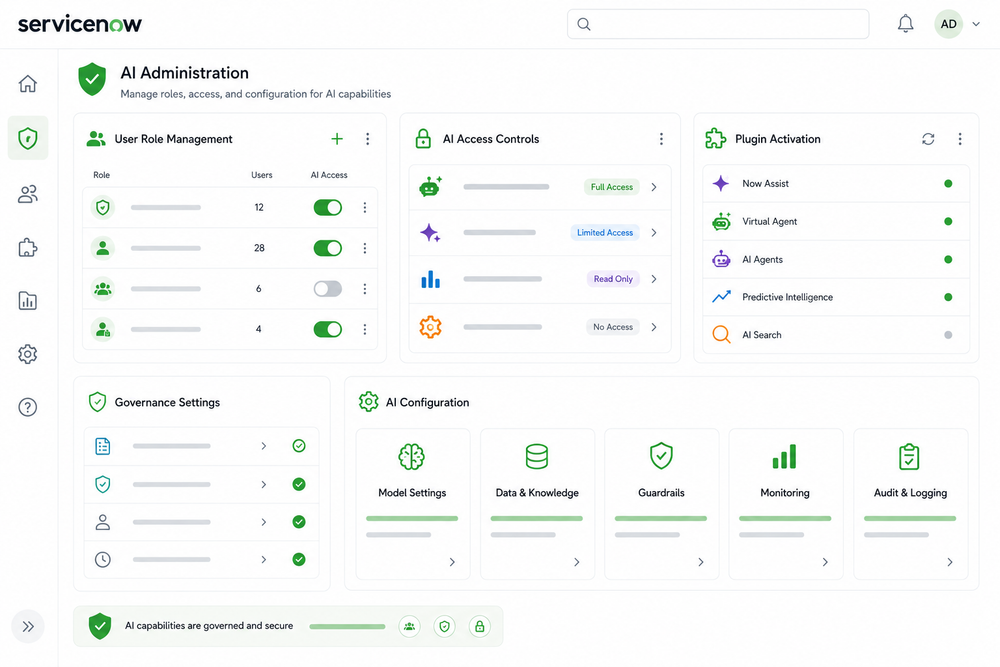
Role-Based Access Control (RBAC) is a security framework that determines who can access, configure, monitor, and use specific capabilities within ServiceNow. When it comes to AI, not every user should have the same level of access. Administrators need permissions to install and configure AI features. Developers and business users need access to AI-powered productivity tools. Stakeholders may need visibility into AI performance without having the ability to modify configurations. Proper role assignment helps organisations maintain security, governance, and accountability while ensuring the right people can benefit from AI capabilities.
Step 1: Understand the Core Roles Required for Now Assist
Before installing or configuring any Now Assist capability, it is important to understand the key roles involved.
System Administrator (admin) is the primary role responsible for installing, configuring, and maintaining Now Assist applications. Administrators manage plugin activation, dependencies, AI configurations, and platform settings.
Now Assist Creator Role allows authorised users to access AI-powered creator capabilities such as code generation, flow creation assistance, catalog item generation, and other productivity features.
AI Agent Admin Role provides full management access to AI agents and agent workflows. Users with this role can create, modify, monitor, and maintain AI agent configurations.
AI Agent Viewer Role provides read-only access. This role is ideal for managers, auditors, compliance teams, and stakeholders who need visibility into AI performance without making changes to the environment.
These roles create a clear separation of responsibilities and reduce governance risks.
Step 2: Install and Configure Now Assist
The installation process begins with a ServiceNow administrator.
Navigate to Application Manager and search for the required Now Assist application. Depending on your licensing and ServiceNow release, you may see products such as Now Assist for Creator, Now Assist for ITSM, Now Assist for CSM, or AI Agent-related applications.
Once the application is available, review any dependencies shown during installation. ServiceNow automatically identifies supporting applications that must be installed before the selected capability can function properly. After validating dependencies, proceed with the installation process. Following installation, administrators should verify that the required plugins are active and that the Next Experience interface is enabled where applicable. This ensures users can access the latest AI-powered experiences across the platform.
Step 3: Assign Roles to Users
After installation is complete, administrators can begin assigning access to users.
Navigate to User Administration → Users and open the required user record. Within the Roles related list, assign the appropriate permissions based on the user's responsibilities.
Users who need access to AI-powered development tools should receive the Now Assist Creator role. Platform teams responsible for managing AI agents should receive the AI Agent Admin role. Business stakeholders who require reporting and oversight should receive the AI Agent Viewer role.
This approach ensures users receive only the permissions necessary for their responsibilities while maintaining strong governance controls.
Step 4: Best Practice Role Assignment Model
A practical governance model often follows these guidelines:
- System Administrators install and configure AI capabilities.
- Developers and creators receive Now Assist Creator access.
- AI Operations teams receive AI Agent Admin permissions.
- Business leaders and auditors receive AI Agent Viewer access.
- Sensitive administrative roles remain limited to a small group of authorised personnel.
Following this model helps organisations maintain security while supporting broad AI adoption.
What is AI Usage Monitoring?
AI Usage Monitoring is the process of tracking how AI capabilities are being used across the organisation. Monitoring helps administrators understand adoption levels, identify potential issues, measure value, and ensure compliance with governance policies. As AI usage increases, monitoring becomes critical for maintaining performance and demonstrating business value.
Step 5: Monitor AI Adoption and Performance
Once Now Assist capabilities are deployed, organisations should actively monitor usage trends and user engagement. ServiceNow provides reporting and dashboard capabilities that help administrators understand which AI skills are being used, how frequently they are being accessed, and where users are generating value. Monitoring also helps identify opportunities for additional training or optimisation.
Administrators should regularly review AI activity, user adoption metrics, usage trends, and workflow performance. This ensures the organisation continues to receive value from its AI investments while maintaining governance standards.
What is AI Scaling?
AI Scaling refers to expanding AI capabilities from a limited deployment into a broader enterprise-wide strategy. Rather than deploying AI within a single department, organisations gradually extend AI capabilities across business units, processes, and operational teams. Successful scaling requires governance, role management, monitoring, and continuous improvement.
Step 6: Scale AI Across the Enterprise
After initial deployment, organisations should focus on expanding AI capabilities strategically rather than enabling everything at once. Start by identifying departments that can benefit from AI-powered productivity improvements. Common starting points include IT Service Management, Customer Service Management, HR Service Delivery, Strategic Portfolio Management, and App Engine development teams. As adoption grows, establish governance reviews, usage monitoring processes, and role audits to ensure AI remains aligned with organisational goals. This approach allows AI programs to scale safely while maintaining compliance and operational control.
Building a Sustainable AI Governance Framework
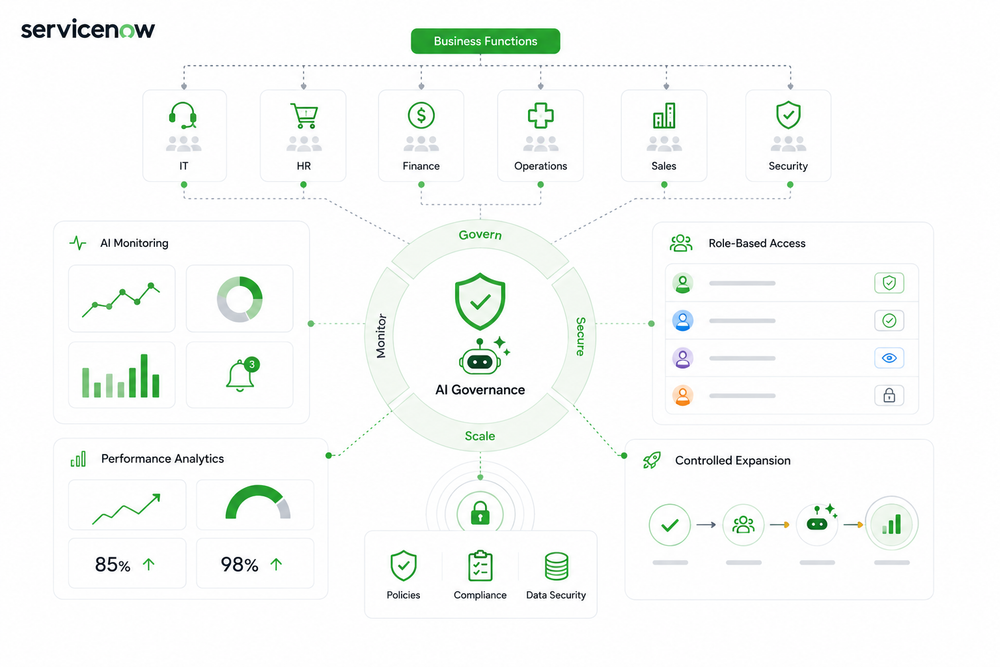
Many organisations focus heavily on activating AI features but spend less time planning governance. Long-term success depends on balancing innovation with control. A sustainable governance framework includes clearly defined roles, regular monitoring, controlled access management, and ongoing optimisation. By combining these practices, organisations can confidently expand AI usage while maintaining visibility, security, and compliance.
As ServiceNow continues to evolve its AI capabilities, organisations that establish strong governance foundations today will be better positioned to take advantage of future innovations.
Conclusion
Now Assist is transforming how organisations work inside ServiceNow, but successful adoption requires more than simply installing a plugin. Organisations must establish the correct roles, monitor usage patterns, and build governance processes that support long-term growth. By assigning responsibilities appropriately, monitoring AI performance, and scaling capabilities strategically, organisations can unlock the full value of ServiceNow's AI platform while maintaining trust, security, and operational excellence.
Key Takeaways
1. Roles Drive AI Governance
Administrators configure AI, creators use AI-powered skills, and AI agent roles provide monitoring and management capabilities.
2. Monitoring Ensures Long-Term Success
Tracking AI adoption and performance helps organisations optimise usage, improve outcomes, and demonstrate business value.
3. Scaling Requires Governance
Successful enterprise AI programs grow through controlled expansion, role-based access, and continuous oversight rather than rapid uncontrolled deployment.