The Shift: Why “Chat” is Dead, and “Action” is King
This is the core challenge facing modern businesses. For the past two years, organisations have primarily leveraged Generative AI for summarisation and content generation, but the industry is now rapidly evolving toward Agentic AI — intelligent systems capable of autonomously planning, coordinating, and executing actions across enterprise workflows.
“Agentic AI or AI agents go beyond generating responses. They are designed to take action autonomously. Think of them as intelligent coworkers who know the steps, connect with your data, trigger workflows, and complete tasks for you. They don’t just recommend—they actually execute.”
Within ServiceNow, this transforms the platform from a System of Record to a System of Action.
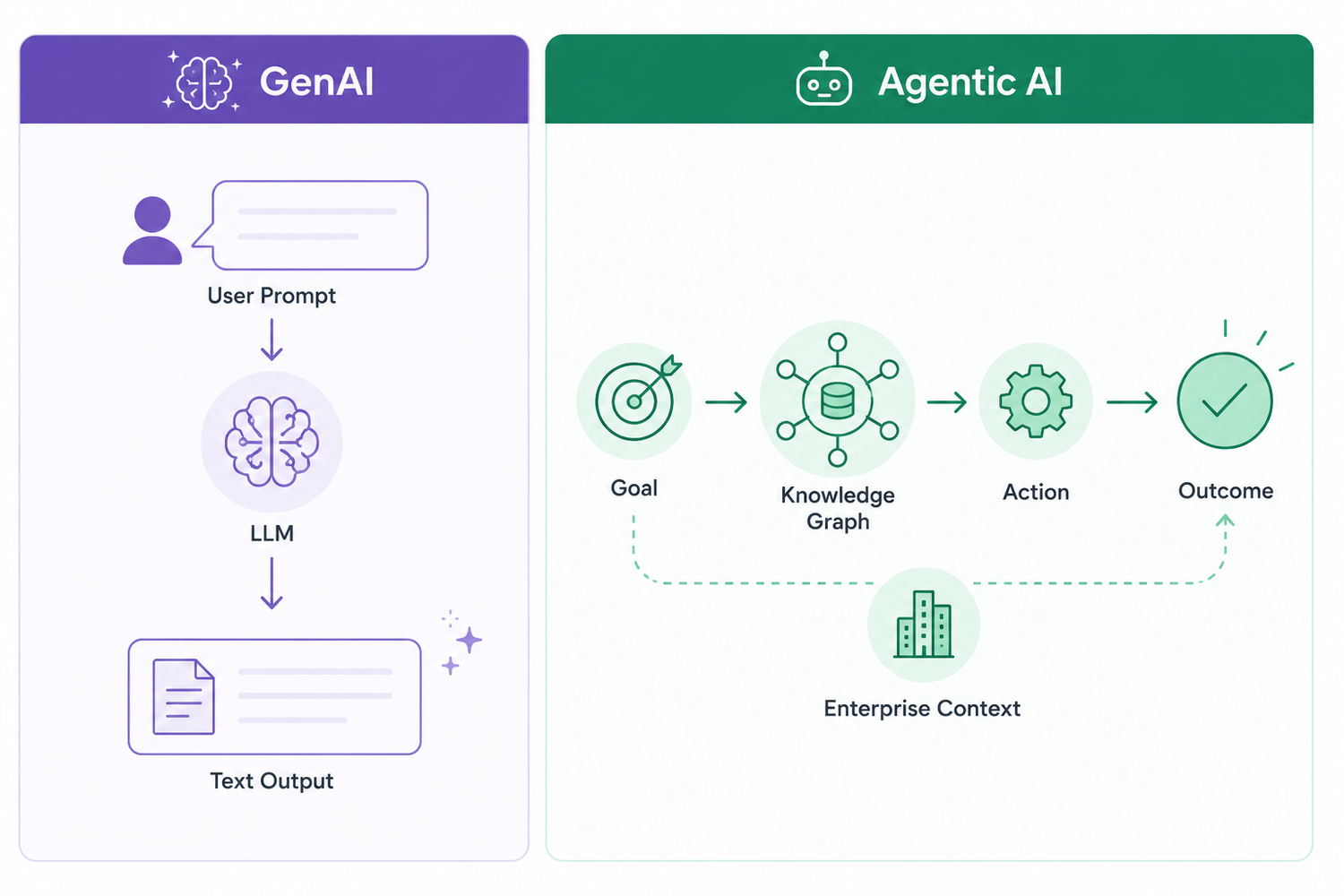
“Generative AI is about creating intelligent context while Agentic AI is about taking intelligent action.”
- Generative AI (Now Assist): “Artificial intelligence systems that don’t just process information but actually generate new content. Large Language Models (LLMs) trained on billions of examples to predict and generate the next best response.”
- Agentic AI: “Goes beyond generating responses. Designed to take action autonomously. For example, instead of just drafting a response, an agent could actually log the incident, suggest a resolution, or close the ticket depending on context and rules.”
ServiceNow’s AI Strategy & Roadmap
- Predictive Intelligence: “Machine learning models that classified incidents and suggested categories.”
- Virtual Agents: “Conversational experiences for employees and customers.”
- Generative AI & Agentic AI (Today): “Intelligence embedded directly into workflows, not bolted on.”
Key Strategic Point: ServiceNow uses a multi-provider LLM strategy.
- Open models: OpenAI, Google Gemini, Anthropic Claude. “Broad comprehension, multi-language support, but data is processed outside ServiceNow.”
- ServiceNow-developed models: Built with NVIDIA and Hugging Face. “Optimised for enterprise context. Data is retained inside ServiceNow.”
“This dual approach gives customers the best of both worlds: openness when you want flexibility and trust when you need enterprise-grade control.”
Responsible AI: The three core pillars: Transparency, Security, and Enterprise-grade Governance via AI Control Tower and Now Assist Guardian.
Deconstructing the Now Assist Architecture
Layer 1: Experiences (Top) – “Where AI meets the end user. IT, HR, Customer Service, Operational Technologies.”
Layer 2: Now Assist (GenAI + Agentic AI) – “Summarises, generates, and acts. Autonomous AI agents that don’t just assist but take action inside workflows.”
Layer 3: Orchestration & Governance – Critical components:
- AI Agent Orchestrator: “Plans and coordinates multiple AI agents to solve end-to-end use cases.”
- AI Control Tower: “Monitoring, observability, and insights into AI usage.”
- Now Assist Guardian: “Enforces trust, bias detection, compliance controls.”
- AI Agent Studio: “Design and configure your own AI agents.”
- AI Agent Fabric: “Enables multiple AI agents, both within and outside ServiceNow, to collaborate in real time.”
The AI Agent Orchestrator is the most critical component because it serves as the central coordination engine that plans, manages, and synchronises multiple AI agents across end-to-end workflows, while the AI Control Tower and Now Assist Guardian are equally critical from a governance perspective as they provide monitoring, compliance, observability, trust, and bias-control capabilities required for secure enterprise AI operations.
Layer 4: Data Foundation – “Workflow Data Fabric, Knowledge Graph, and ServiceNow’s single data model. AI isn’t operating blindly. It has structured, trusted enterprise data to reason over.”
“The quality of AI always depends on the quality of data, and this is where ServiceNow shines.”
The Five Now Assist Skills
Agentic AI – The Service Lifecycle in Action
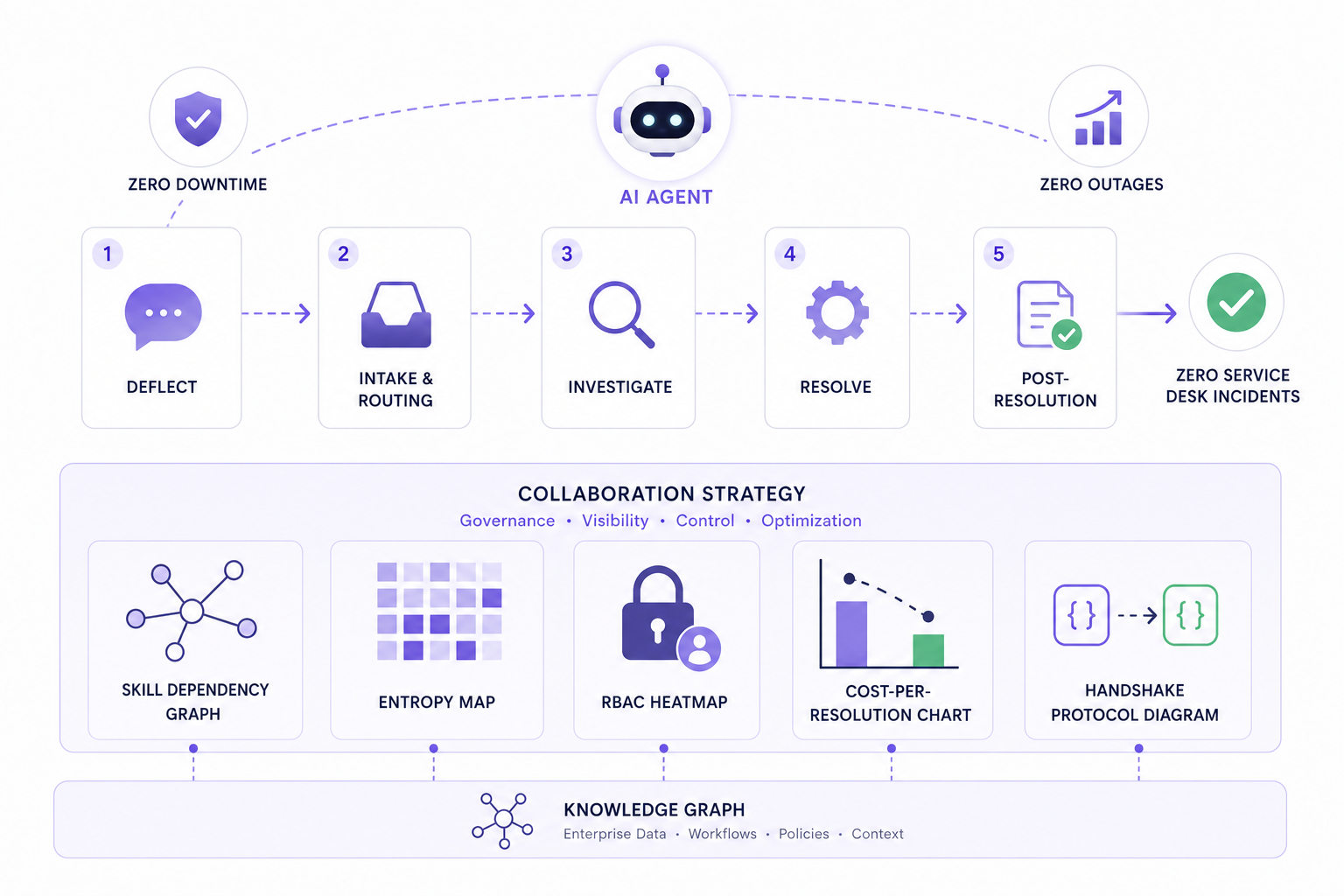
Stage 1: Deflect – “AI prevents issues from reaching humans.”
- Use cases: “Help me find an answer” (auto-answers using knowledge bases).
Stage 2: Intake & Routing – “AI ensures tickets are captured, categorised, and prioritised.”
- Use cases: Email to task, task triage, AI forecaster (predicts SLA breaches before they occur), work planner.
Stage 3: Investigate – “AI reduces manual diagnosis.”
- Use cases: DOT troubleshooter (analyses logs to pinpoint issues), resolution plan generation, user/customer 360.
Stage 4: Resolve – “AI executes tasks directly.”
- Use cases: Reset password expert, software installation expert, payroll and benefits expert, and automatic ticket closure.
Stage 5: Post-Resolution – “AI helps us learn and improve.”
- Use cases: Post-event summary generation, knowledge management, continuous service improvement, task trends.
“Agentic AI doesn’t just generate insights. It acts on them across the service lifecycle.”
The Plugin Activation Workflow (Technical How-To)
A hands-on walkthrough: Here is the condensed technical workflow for enabling Now Assist:
- Navigate: Application Navigator → Search “Now Assist” → Now Assist Admin Console.
- Browse Plugins: Categorised by Technology Workflows, Customer Workflows, Employee Workflows.
- Install: Click “Get Plugin” → Redirect to ServiceNow Store → Requires licensing (e.g., Now Assist for ITSM).
- Verify: Back in Admin Console → View “Installed” chart (e.g., Now Assist for Creator, Now Assist for ITSM).
- Activate Skills: Go to “Now Assist Features” → Select plugin (e.g., ITSM) → View skills (Incident Assist, Incident Summarisation, Resolution Generation) → Click “Activate Skill.”
- Configure: Choose input data (tables, fields like Short Description, Work Notes), customise prompt (or use out-of-box), test on a record, set availability (always available or role-based), and specify display location (Now Assist panel).
Pro Tips:
- Always test in sub-production first.
- Keep track of activated plugins for governance.
- Some plugins require specific roles like sn_ai_admin or now_assist_gradient.
The Now Assist Panel (The User Interface)
The Now Assist Panel is: “A side panel inside the Next Experience UI. Always available, context-aware, and tied directly to the work you’re doing.”
Capabilities are:
- Summarise records and conversations.
- Suggest next best actions or resolutions.
- Generate knowledge articles or draft responses.
- Search across enterprise knowledge with natural language.
Activation: Now Assist Admin Console → Now Assist Experiences → Now Assist Panel → Turn On. A new icon appears in the top navigation bar.
Example prompts:
- “Explain change risk for change request number [XXX].”
- “How many open incidents do we have in total?”
- “Summarise incident [number].”
“No switching tabs, no hunting through knowledge bases. The AI is right there. Context-aware and action-ready.”
The Tinyloop Collaboration Strategy (Visuals & Governance)
The AI Control Tower, Now Assist Guardian, and Knowledge Graph collectively form the governance and contextual intelligence layer of the platform, ensuring trusted AI operations, enterprise-wide visibility, compliance, and intelligent decision-making — an area where Tinyloop delivers significant strategic value through workflow governance and operational transformation expertise.
The Problem: Activating plugins and skills is easy. But configuring them for your specific enterprise data model, workflows, and compliance rules is hard.
The Tinyloop Solution: Tinyloop builds the 5 visuals required to operationalise the architecture:
- The Skill Dependency Graph: Maps which Glide tables (Incident, Change Request, SCTASK) connect to which LLM skills.
- The Entropy Map: Visualises where Agentic AI fails (e.g., password reset routing fails due to missing MFA).
- The RBAC Heatmap: Shows where PII (from Work Notes) touches the LLM context window—critical for Now Assist Guardian.
- The Cost-per-Resolution Chart: Compares human cost vs. Agentic AI cost using the guideline “deflect → resolve” metrics.
- The Handshake Protocol Diagram: Maps how the AI Agent Orchestrator passes JSON payloads between multi-agent workflows.
Why this matters: “Power without trust is risky.” Tinyloop ensures your agentic workflows are governed, auditable, and compliant.
Three Key Takeaways
- GenAI creates context; Agentic AI takes action. “Together they transform ServiceNow from a system of record into a system of action.” Your architecture must include the AI Agent Orchestrator and Knowledge Graph.
- Skills are the building blocks. The five categories (Summarise, Generate, Resolve, Recommend, Custom) map directly to out-of-the-box use cases. Activate them via the Now Assist Admin Console and test in sub-production first.
- Governance is not optional. “Power without trust is risky.” Use AI Control Tower, Now Assist Guardian, and role-based skill availability. Tinyloop provides the visual heatmaps and dependency graphs to enforce this at scale.