Cybersecurity teams face a constant challenge: there is simply too much information to process. Every day, Security Operations Centre (SOC) analysts must review alerts, investigate suspicious activity, analyse security incidents, and document their findings. The volume of data can be overwhelming, and when a serious security incident occurs, every minute matters. This is where Now Assist for Security Incident Response (SIR) can help.
Now Assist uses Artificial Intelligence (AI) to support security analysts by automatically generating summaries, recommending next steps, creating resolution notes, and helping teams understand the root cause of incidents. Instead of spending hours reading work notes and manually documenting findings, analysts can focus on investigating and resolving threats.
In this guide, you'll learn:
- What Now Assist for Security Incident Response is
- The key AI capabilities available
- How to configure these capabilities in ServiceNow
- How to apply governance and security controls using Now Assist Guardian
Whether you're a ServiceNow administrator, Security Operations engineer, or consultant, this guide will help you get started.
What Is Security Incident Response (SIR)?
Security Incident Response (SIR) is a ServiceNow application designed to help organisations manage cybersecurity incidents from detection through to resolution.
Think of it as a central workspace where security teams can:
- Track incidents
- Investigate threats
- Assign tasks
- Record findings
- Document resolutions
- Report on outcomes
Without automation, many of these activities are highly manual and time-consuming.
What Is Now Assist?
Now Assist is ServiceNow's Generative AI capability.
It uses Large Language Models (LLMs) to analyse information stored in ServiceNow and provide intelligent assistance to users.
Rather than replacing security analysts, Now Assist acts as an AI assistant that helps users work faster and more efficiently.
Examples include:
- Summarising long incident records
- Generating recommendations
- Creating closure notes
- Analysing root causes
- Identifying patterns between incidents
Why Use Now Assist for Security Operations?
When a security incident occurs, analysts often spend significant time:
- Reading investigation notes
- Reviewing logs
- Understanding timelines
- Documenting findings
- Writing reports
Now Assist automates much of this work.
The result is:
- Faster investigations
- Reduced manual effort
- Consistent documentation
- Improved analyst productivity
- Better decision-making
Key AI Skills Available in Now Assist for SIR
Before configuring the solution, it's important to understand the capabilities available.
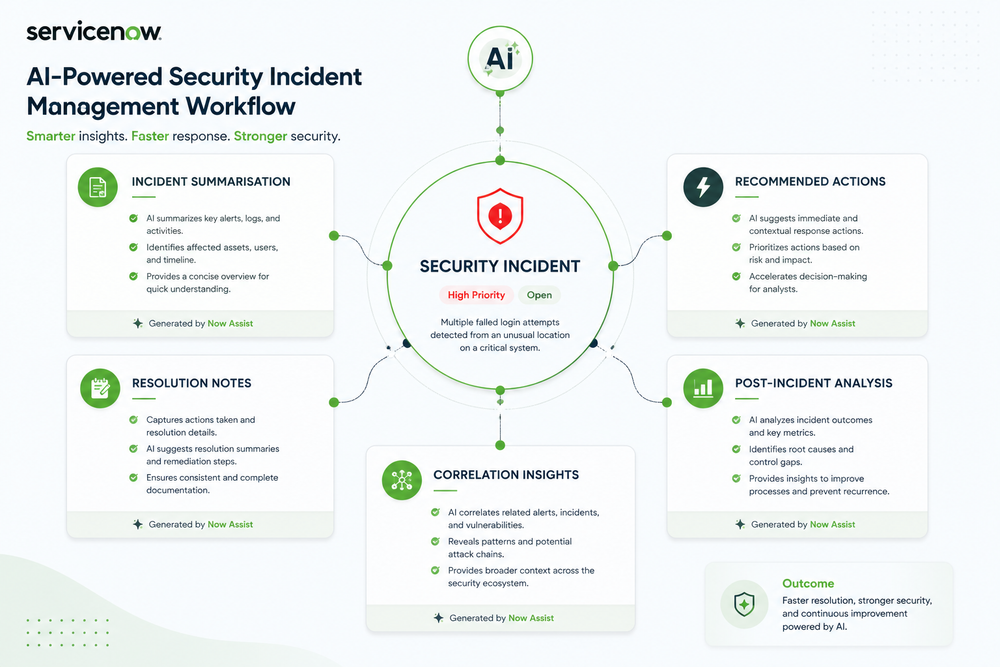
1. Security Incident Summarisation
This skill automatically creates a concise summary of an incident.
Instead of reading dozens of work notes, analysts receive a quick overview that explains:
- What happened
- Current status
- Key activities performed
- Important findings
2. Recommended Actions
This capability suggests the next best actions for analysts.
Recommendations are based on:
- Incident context
- Historical incidents
- Similar investigations
This helps teams resolve incidents faster and more consistently.
3. Resolution Notes Generation
At the end of an investigation, analysts must document what happened and how it was resolved.
Now Assist can automatically generate these closure notes, reducing administrative effort.
4. Post-Incident Analysis
After an incident is resolved, organisations typically perform a review.
Now Assist helps generate:
- Root cause analysis
- Impact assessment
- Lessons learned
- Recommendations for improvement
5. Correlation Insights
Many incidents are connected.
This skill helps identify relationships between:
- Users
- Devices
- Applications
- Configuration Items (CIs)
- Security observables
This allows analysts to uncover hidden patterns that might otherwise be missed.
Prerequisites
Before starting the configuration process, ensure the following requirements are met.
Required Plugin
The Now Assist for Security Operations plugin must already be installed in your ServiceNow instance.
Required Roles
You should have administrative permissions such as:
- sn_si.admin
- Now Assist Administrator permissions
These permissions allow you to activate and manage AI skills.
Security Operations Knowledge
A basic understanding of the Security Incident Response application is recommended.
Step 1: Open the Now Assist Admin Console
The Now Assist Admin Console is the central location for managing AI capabilities within ServiceNow.
How to Access It
- Open the Application Navigator.
- Search for Now Assist Admin.
- Select Now Assist Admin.
You will be taken to the Now Assist Admin Overview page.
This page shows:
- Installed AI capabilities
- Available skills
- Activation status
- Configuration options
Think of this page as the control centre for all Now Assist functionality.
Step 2: Enable the Core Now Assist Framework
Before Security Operations skills can be used, the underlying Now Assist framework must be enabled.
Steps
- In Now Assist Admin, select Skills.
- Select Platform.
- Locate the Navigation skill.
- Click Turn On.
Why This Is Important
The Navigation skill enables the Now Assist panel that users interact with inside workspaces.
Without this step, Security Operations skills will not be accessible.
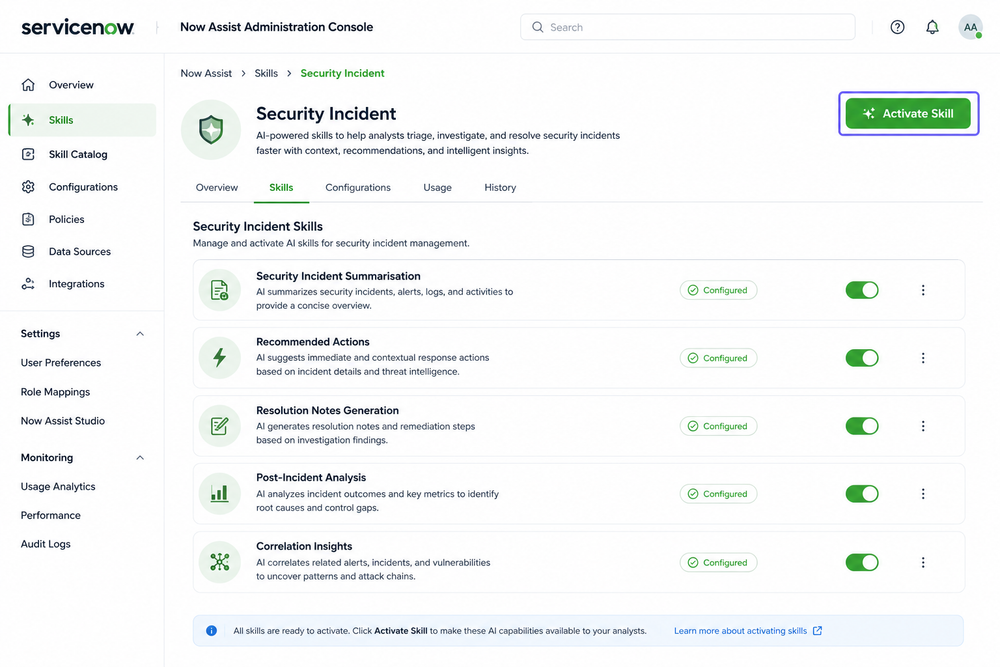
Step 3: Enable Security Incident Skills
Now it's time to activate the Security Operations capabilities.
Steps
- Navigate to:
Technology → Security Operations
- Select the Security Incident tile.
- Click View Details.
You will now see all available Security Incident AI skills.
Activate Security Incident Summarisation
Steps
- Locate Security Incident Summarisation.
- Click Activate Skill.
During configuration, you'll see a section called: Choose Input Data For
This determines which incident states can use the skill. Examples include:
- New
- Work In Progress
- Review
- Closed
Choose the states that make sense for your organisation.
Test the Output
You can test the AI-generated summary against an existing incident record. This allows you to verify:
- Accuracy
- Quality
- Relevance
Before enabling the skill for users.
Configure Visibility
Enable:
- In-product Display
- Now Assist Panel
This makes the capability visible inside the Security Incident workspace. Finally, select Activate.
Activate Recommended Actions
Repeat the same process for:
Recommended Actions
This allows AI to suggest next steps during investigations.
Activate Resolution Notes Generation
Activate:
Resolution Notes Generation
This capability automatically drafts closure notes when incidents are resolved.
Activate Post-Incident Analysis
Activate:
Post-Incident Analysis
This skill analyses:
- Incident details
- Timeline information
- Work notes
- Investigation activities
and produces:
- Root cause analysis
- Impact summaries
- Lessons learned
Activate Correlation Insights
Activate:
Correlation Insights
This capability helps analysts identify relationships between incidents, users, devices, and assets.
Step 4: Configure AI Governance with Now Assist Guardian
Enabling AI is only part of the process. Organisations must also ensure AI is being used safely and responsibly.
This is where Now Assist Guardian comes in.
What Is Now Assist Guardian?
Now Assist Guardian is a governance and protection layer for Generative AI.
It helps organisations:
- Reduce AI risks
- Detect harmful content
- Prevent prompt injection attacks
- Monitor AI usage
Think of it as a security guard for your AI system.
Configure Offensiveness Detection
Navigate to: Now Assist Admin → Settings → Now Assist Guardian
Locate the Offensiveness section. You can choose:
Log Only
Records potentially offensive content without blocking it. Recommended when first assessing AI behaviour.
Block and Log
Blocks inappropriate responses and records the event.
Severity Levels Explained
Low Severity
Most restrictive setting. Captures even mild offensive language.
High Severity
Less restrictive. Only captures severe cases.
Configure Prompt Injection Protection
Prompt injection is an attempt to manipulate AI into ignoring instructions or revealing information it should not.
To configure protection:
- Open Prompt Injection settings.
- Enable protection.
- Choose:
- Log Only
- Block and Log
- Select an appropriate severity level.
Many organisations start with Log Only before moving to Block and Log after testing.
Final Thoughts
Now Assist for Security Incident Response can significantly improve the efficiency of Security Operations teams. By automating repetitive tasks such as summarisation, recommendations, closure notes, and post-incident reviews, analysts can spend more time investigating threats and less time managing paperwork. When combined with Now Assist Guardian, organisations gain both productivity and control, ensuring AI is deployed securely and responsibly. The result is a faster, smarter, and more resilient Security Operations capability built on the ServiceNow platform.
Key Takeaways
- Now Assist acts as an AI assistant for SOC analysts, helping them investigate incidents faster and with less manual effort.
- Five core AI skills can be enabled, including Incident Summarisation, Recommended Actions, Resolution Notes, Post-Incident Analysis, and Correlation Insights.
- Now Assist Guardian provides governance and protection, helping organisations safely deploy Generative AI in Security Operations.
This version is much easier for business readers and junior ServiceNow administrators to follow while still providing enough technical depth for implementation teams.