Artificial Intelligence is quickly becoming part of everyday business operations, and ServiceNow Now Assist is helping organisations bring AI directly into the workflows their employees use every day. Rather than adding another standalone AI tool, Now Assist is built directly into the ServiceNow platform. It helps employees and support teams work more efficiently through AI-powered summarisation, content generation, recommendations, and workflow assistance. Whether your goal is to reduce manual effort, improve service desk productivity, or provide faster support experiences, understanding how to configure Now Assist is an important first step.
This guide explains how to access the Now Assist Admin Console, install the required plugins, activate AI skills, and make these capabilities available to your users.
Accessing the Now Assist Admin Console
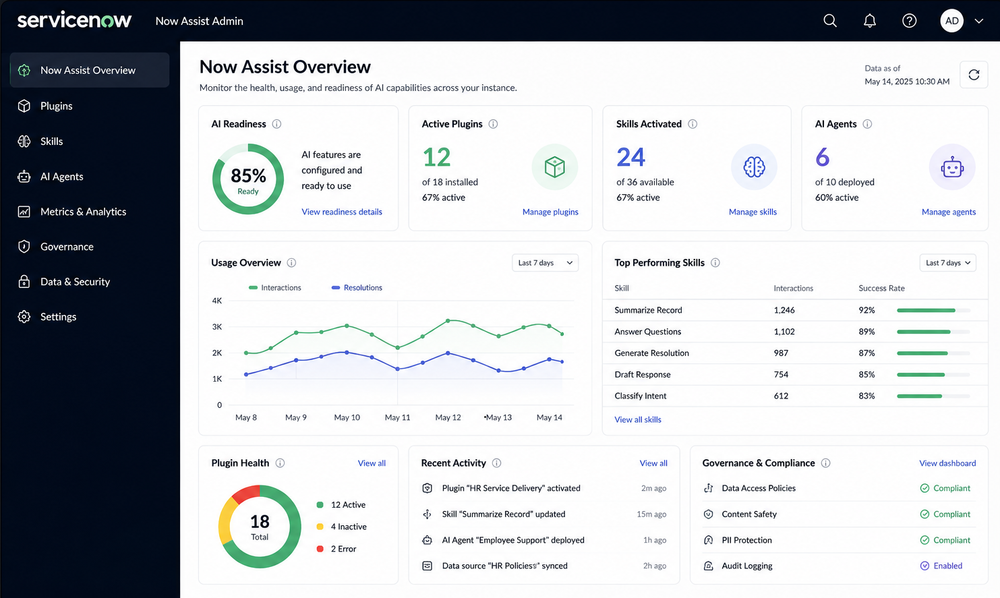
The Now Assist Admin Console is the central location for managing AI capabilities within ServiceNow. From this console, administrators can:
• Activate and configure AI skills
• Monitor usage and readiness
• Review governance settings
• Configure user experiences
To access the console:
- Log in to ServiceNow with administrator access.
- Open the Application Navigator.
- Search for "Now Assist".
- Select Now Assist Admin Console.
- Open the Overview tab.
The Overview page provides a quick snapshot of your current AI environment, including installed plugins, available skills, and any actions that may be required before users can begin using Now Assist features.
Browsing Available Now Assist Plugins
Once inside the Admin Console, the next step is to review the available plugins. ServiceNow organises Now Assist capabilities into workflow-specific categories so organisations can enable AI where it delivers the most value.
Technology Workflows
These plugins support IT and operational teams and may include:
• Now Assist for ITSM
• Now Assist for CMDB
• Now Assist for Security Operations
• Now Assist for Strategic Portfolio Management
• Now Assist for Integrated Risk Management
Customer Workflows
These plugins are designed to support customer service and customer-facing operations.
Employee Workflows
These plugins focus on employee services, HR processes, and internal support experiences. Selecting the right plugin depends on which business area you want to enhance with AI capabilities.
Installing a Now Assist Plugin
After identifying the appropriate workflow package, the next step is installation. For example, organisations looking to improve IT Service Management processes may choose to install Now Assist for ITSM.
To install a plugin:
- Select the required plugin.
- Click Get Plugin.
- Select Install Plugin.
- You will be redirected to the ServiceNow Store.
- Verify that the required licensing is available.
- Complete the installation process.
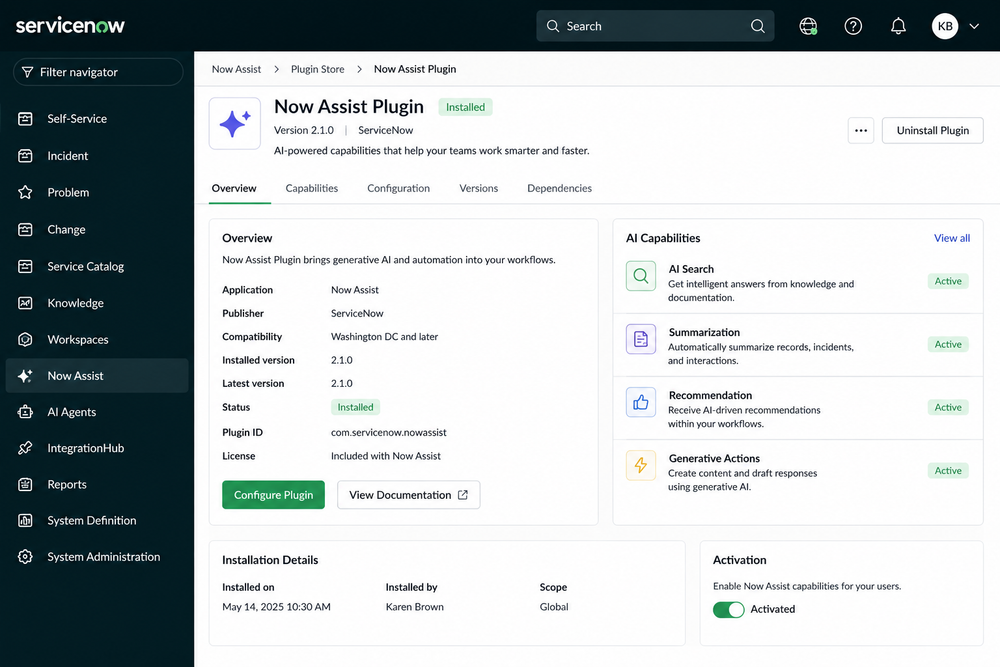
Once installation is complete, the plugin will appear within the Admin Console and become available for configuration.
Activating AI Skills
Installing a plugin provides the foundation, but the real value comes from activating the AI skills included within that plugin.
For example, a typical ITSM implementation may include several AI-powered capabilities. Incident Assist helps support agents investigate and troubleshoot issues more quickly.
Incident Summarisation automatically creates concise summaries of lengthy ticket histories. Resolution Generation suggests potential fixes based on previous incidents and historical data. Chat Summarisation creates summaries of conversations so agents can quickly understand context. Knowledge Generation assists with creating knowledge articles from successful resolutions. And Change Risk Explanation helps teams understand the potential impact of proposed changes before implementation.
To activate a skill:
- Open the Now Assist Features section.
- Select the installed plugin.
- Review the available skills.
- Choose the skill you want to enable.
- Click Activate Skill.
- Review the configuration settings.
- Confirm data sources.
- Test the AI responses.
- Activate the skill.
Each skill can be enabled independently, allowing organisations to adopt AI capabilities gradually and focus on the areas that deliver the greatest business value.
Making Now Assist Available to Users
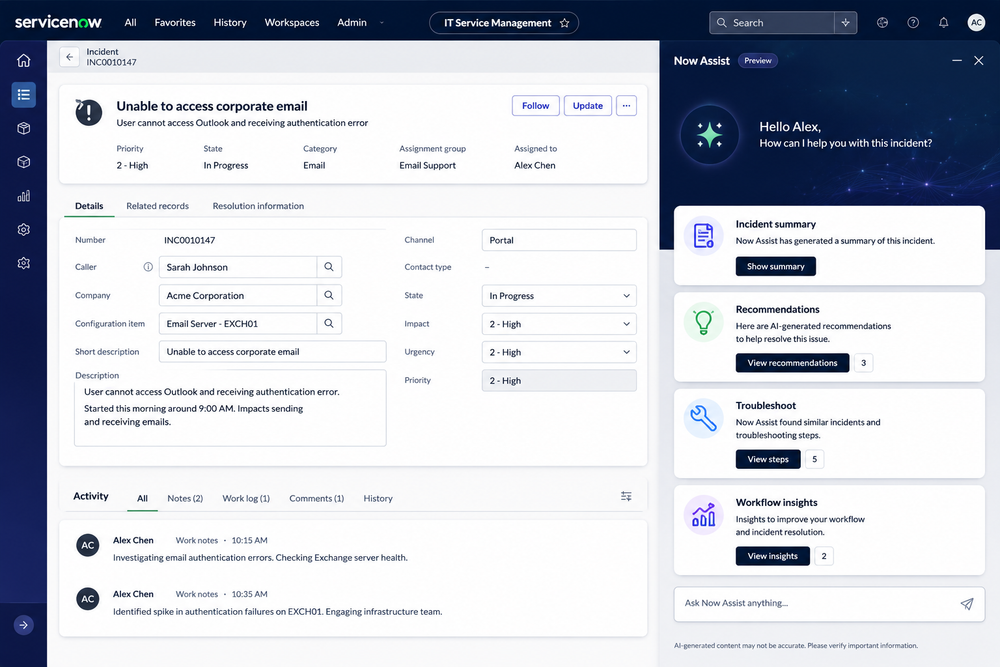
After configuring the required skills, the final step is enabling access for end users. When the Now Assist panel is enabled, users can interact directly with AI from within their normal ServiceNow workspaces. The AI assistant can help users:
• Summarise incidents
• Generate recommendations
• Draft content
• Review records
• Find relevant information faster
• Assist with routine operational tasks
This allows teams to work more efficiently without leaving the applications they use every day.
Best Practices for a Successful Deployment
As with any AI initiative, a structured approach can help maximise value while reducing risk. Start with a small number of high-value use cases, such as incident summarisation or knowledge generation. Validate AI-generated responses before publishing them externally or using them for customer-facing communications. Use role-based access controls to ensure users only access information appropriate to their role. Monitor adoption and usage metrics to identify opportunities for optimisation and continuous improvement.
Review governance settings regularly to ensure AI usage aligns with organisational policies and compliance requirements.
Why Now Assist Matters
Many organisations invest heavily in ServiceNow but continue to rely on manual processes for activities such as ticket analysis, content creation, and knowledge management.
Now Assist helps bridge that gap. By embedding Generative AI directly into existing workflows, organisations can improve productivity, reduce repetitive work, and help employees focus on higher-value activities. The result is a more efficient service experience, faster resolution times, and a stronger return on investment from the ServiceNow platform.
Final Thoughts
Now Assist is more than just another AI feature. It represents a practical way for organisations to bring Generative AI into everyday operations without changing how employees work. By installing the right plugins, activating the appropriate skills, and following a structured rollout approach, organisations can begin realising the benefits of AI across IT, employee services, customer operations, and beyond. For ServiceNow customers looking to increase productivity and accelerate digital transformation, Now Assist provides a strong foundation for building AI-powered workflows that deliver measurable business value.
Three Key Takeaways
1. Now Assist Brings Generative AI Directly Into ServiceNow Workflows
Now Assist helps organisations improve productivity by providing AI-powered summarisation, recommendations, content generation, and workflow assistance directly within the ServiceNow platform.
2. Successful AI Adoption Starts With the Right Configuration
Installing the appropriate plugins and activating the right AI skills ensures teams can take advantage of Now Assist capabilities that align with their business processes and operational goals.
3. Start Small, Measure Results, and Scale Strategically
Organisations typically achieve the best outcomes by beginning with high-value use cases such as incident summarisation and knowledge generation before expanding AI capabilities across additional workflows.